
White paper: Cybersecurity
Securing the enterprise browser

TABLE OF CONTENTS
- From consumer browser to enterprise workspace – why now?
- From security to control to compliance (last-mile DLP and auditability)
- Solution architectures: How the models differ
- Economics, cost optimization and pricing levers
- AI in the browser: Guardrails and embedded productivity
- Deployment patterns and customer segmentation
- Evaluation checklist: How customers compare options
- Outlook: How the market will develop
- User experience and integration depth will be the primary drivers of success
- Vendor highlights
- Glossary
Includes discussion of Acium, Atakama, Broadcom (AVGO), Check Point (CHKP), Cisco (CSCO), Citrix, Cloudflare (NET), Conceal, CyberArk (CYBR), Google (GOOGL), HERE, Island, Keep Aware, LayerX, Mammoth Cyber, Menlo Security, Microsoft (MSFT), Netskope (NTSK), Palo Alto (PANW), Red Access, Seraphic, SquareX, Surf Security, Zscaler (ZS).
From consumer browser to enterprise workspace – why now?
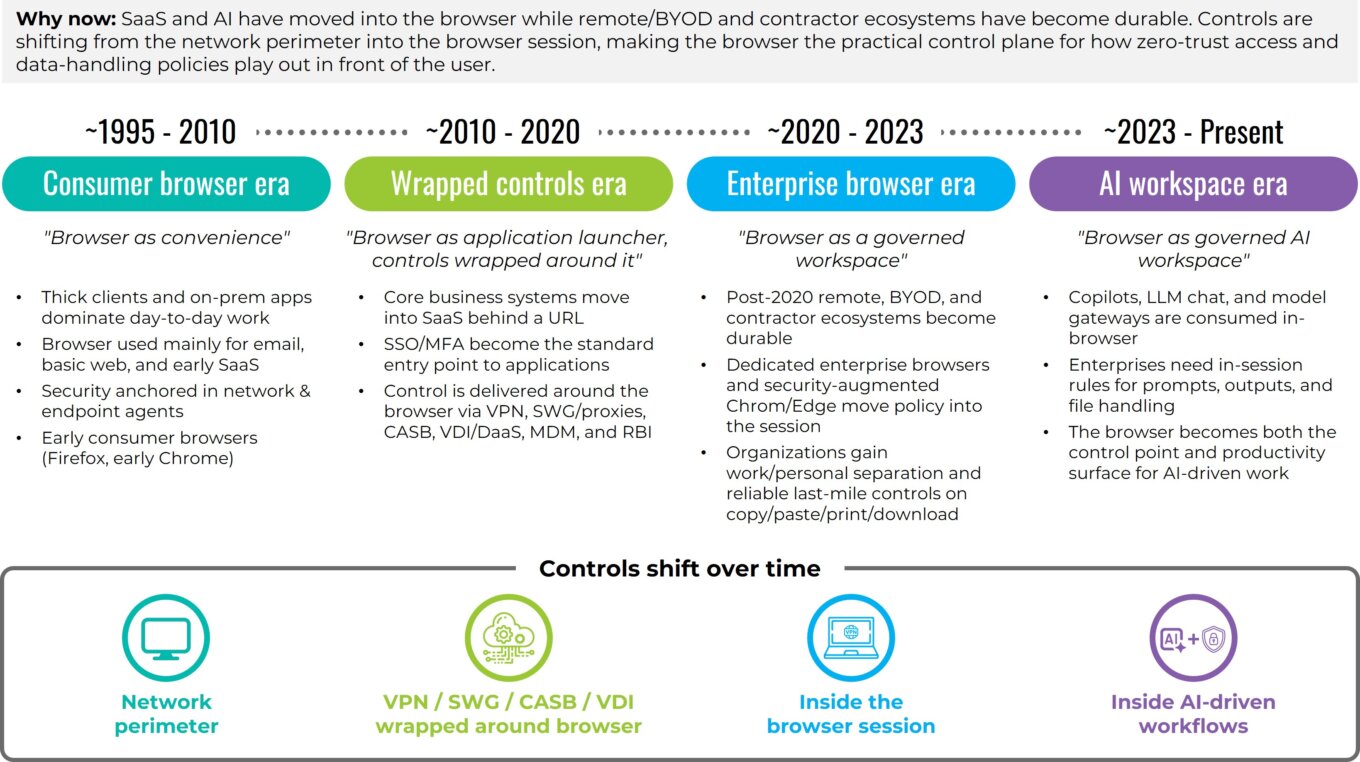
The browser has quietly become the enterprise’s primary workspace. Single sign-on (SSO) and multi-factor authentication (MFA), customer and patient records in SaaS applications, invoice and onboarding approvals, administrative-console changes, data exports, and everyday file handling are increasingly available behind a URL, yet the default consumer browsers such as Chrome and Edge that power this work were never designed to enforce governance at the moment of use.
These market-share-leading browsers excel at reach and compatibility and have historically served consumer needs like shopping, media and entertainment. However, they do not natively provide enterprise-grade separation of work and personal identities, reliable last-mile data-loss controls, or the structured audit trails organizations need to prove compliance. That gap has pushed security controls to wrap around the browser.
The market is now shifting those controls into the browser session itself so policy and user experience align where work actually happens. At the same time, AI-native consumer browsers are experimenting with assistant-centric experiences, but without the enterprise-grade separation of identities, data controls and evidence that large organizations require.
As this shift unfolds, it is worth looking at the market itself. How mature is it? How large will it become? Who is adopting this technology? Although multiple vendors now have credible deployments, the enterprise browser category is still early in formal market maturity. We view it as an early but rapidly accelerating segment with three prominent characteristics:
- Buyer understanding is rising quickly. Most security leaders can now articulate the need for session-level governance, last-mile data leak protection (DLP), and AI usage controls even if they have not yet deployed an enterprise browser.
- Architectures are converging. Dedicated work browsers, extension-based hardening and selective isolation are now recognized patterns rather than experiments.
- Evaluations are structured. Enterprises consistently assess user experience, performance, identity and secure service edge (SSE) integration, audit depth, and economics tied to virtual desktop infrastructure (VDI) and virtual private network (VPN) displacement.
We estimate that fewer than 5% of enterprises have adopted browser-level control broadly, while another 10% to 15% are evaluating it, especially in regulated and SaaS-centric environments. The majority, roughly 50% to 60% by our estimate, acknowledge the need but have not yet formalized evaluation. This distribution reflects a classic early-adopter profile for the category.
From a market-size perspective, browser governance touches a large share of workers. Of about 250 million to 350 million relevant enterprise SaaS seats globally, current spend across dedicated enterprise browsers, extension-based governance, and session-layer control suggests a practical, near-term total addressable market of $1 billion to $3 billion expanding toward $6 billion to $15 billion over the next 5 to 10 years as browser-centered AI workflows standardize. This projection aligns with the adoption curves of adjacent categories like cloud access security broker (CASB), secure web gateway (SWG), DLP, and zero-trust network access (ZTNA) once evaluations and architectures solidified. These figures represent First Analysis estimates informed by vendor briefings, customer references and adjacent SSE, CASB, and DLP market benchmarks. Since this category is still emerging, formal third-party industry sizing remains limited.
Against this backdrop of early but accelerating market maturity, AI has acted as a catalyst. Most copilots, large language model (LLM) chat interfaces, and model gateways are used in the browser, where users enter prompts that often draw from data across multiple SaaS applications and move sensitive outputs to these and other applications. This raises two simultaneous needs: 1) a need for enforceable in-session rules that govern prompts, outputs, and file handling and 2) a need for assistive capabilities that materially improve throughput without leaking data. As we noted in our AI security report, early AI deployments in security have also revealed practical limits like false positives, opaque detections and the operational cost of black-box decisions. These limits have pushed customers toward approaches that combine strong, explainable controls with measurable efficiency gains. In short, the browser has become both the control point and the productivity surface for AI-driven work. Later in this report, we explore how these AI dynamics reinforce the browser’s role as the primary workspace rather than a channel AI displaces.
For clarity, we define the enterprise browser as a dedicated, Chromium-based work browser with embedded security and management. It isolates corporate activity from personal use; enforces zero-trust policy at the session layer using identity, posture (how secure a device is) and application context; and provides last-mile controls for copy-paste actions, printing, downloads, watermarking and trust marking, view-only modes, and screenshot handling, all backed by structured, exportable audit logs. Compared with consumer Chrome and Edge browsers, an enterprise browser enables deeper administrative policy, stronger identity isolation and credential protections, granular and reliable data-in-use controls, and hardened defenses against tampering and exfiltration.
COVID-19 created more urgency to shift. Post-2020 remote work arrangements, contractor ecosystems, and the increase in employees and contractors using their personal devices at work (bring-your-own-device, or BYOD) made the challenge of managing access to enterprise resources more difficult. Legacy approaches to address this challenge offer control but at a cost. For example, VDI, desktop-as-a-service (DaaS) and full-device mobile device management (MDM) introduce material operational friction by requiring IT to provision and maintain full virtual desktops or locked-down device profiles, each with its own configuration, updates and support burden. For users, these solutions add extra steps, slow logins, and create a second workspace they must navigate just to access standard SaaS applications. VPNs collapse application-specific need into blanket network connectivity, enlarging the trust zone and thereby introducing risk in ways modern zero-trust models avoid. Remote browser isolation (RBI) contains web risk by executing active content remotely but can add latency and cost if applied broadly. Today, browser‑centric models offer a better solution. Two browser-centric models now dominate: 1) using dedicated enterprise browsers, which standardize a governed Chromium workspace with reliable last‑mile controls and 2) hardening and securing conventional Chrome and Edge browsers (“the browsers you have”) with extensions and agents. Many enterprises blend the two by persona and device context, across managed devices and unmanaged devices (BYOD), rather than following a single, one‑size‑fits‑all pattern.
Evolution of the browser workspace
Source: First Analysis.
Adoption patterns reflect this pragmatism. Early wins for the browser-centric model are in situations where enterprises interact with contractors and other third parties, M&A transition teams, and BYOD populations (including unmanaged devices). In these environments, IT cannot easily standardize corporate device builds or deploy heavy agents, which limits what departments can reliably install or control. On managed fleets (the devices an enterprise controls) and BYOD, many organizations begin by hardening the browsers already installed and reserve a dedicated enterprise browser for higher-risk personas and workflows. RBI is applied selectively for the riskiest destinations and file types, and VDI is held in reserve for niche legacy applications. Across all models, customers are converging on the same evaluation criteria: depth and reliability of last-mile controls; user experience and performance under real conditions; clean integrations with identity, posture and security tooling; telemetry that lands well in existing incident response workflows; credible compliance evidence; economics that tie licensing to clear offsets in VDI, VPN and support expense; and measurable gains in throughput and productivity. As workflows and AI assistants move deeper into SaaS, the browser is becoming the practical control plane for how zero-trust access and data-handling policies play out in front of users.
Put differently, the market is in its early stages, the need is acute and acceleration is visible. As more AI-driven actions occur in the browser, session-level governance is becoming a foundational element of the modern enterprise workspace. Because the browser is now where both human and AI-assisted work originate, the focus is shifting from perimeter security to last-mile, data-in-use controls and structured auditability.
From security to control to compliance (last-mile DLP and auditability)
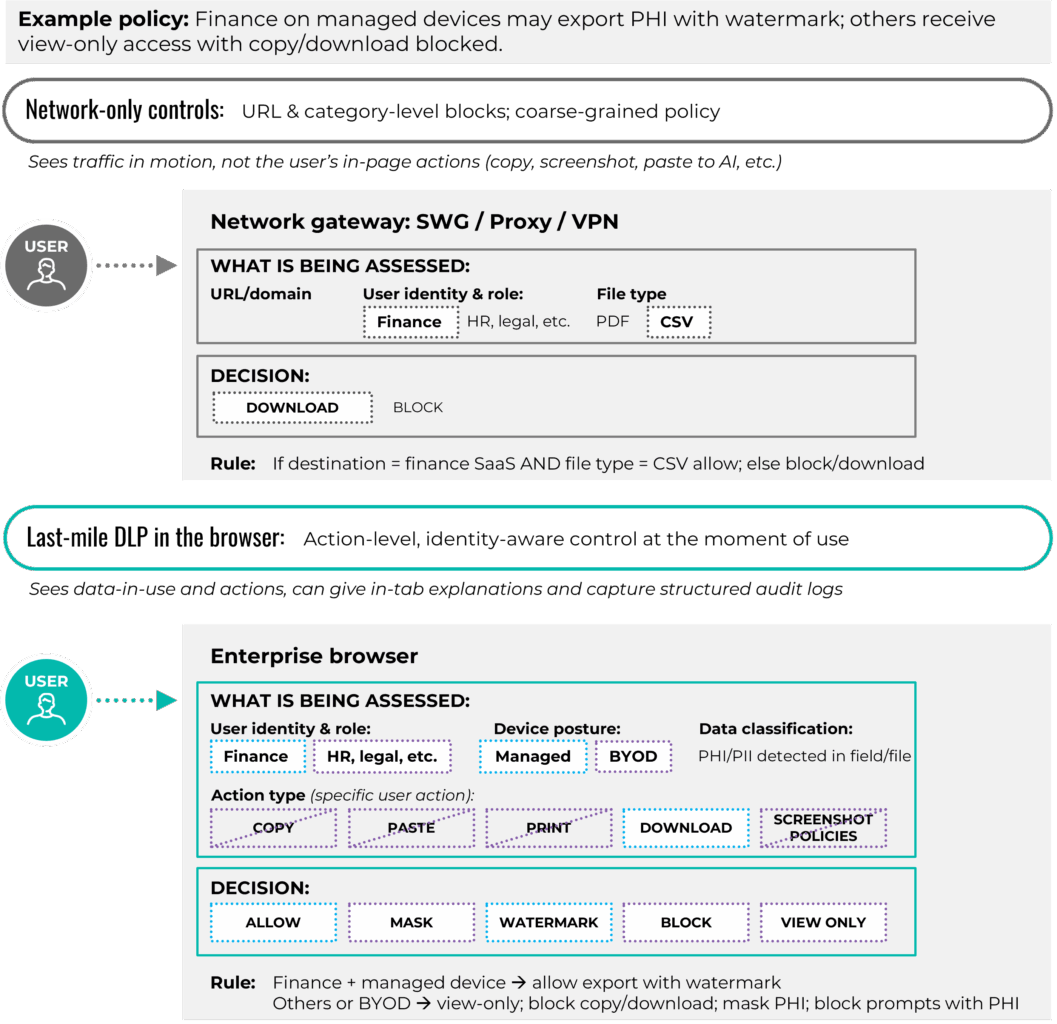
The focus of the security sector’s discussion of how to best address security challenges has shifted from perimeter control to control within the browser session. When the browser is the workspace, the most reliable place to govern data in use is inside the browser, where users type prompts, populate fields, preview files and issue approvals. An enterprise browser can enforce security on these actions. Copying, pasting, printing, downloading, accessing clipboards and capturing screens can be permitted, masked, watermarked or blocked based on user identity, device posture, application type and data type. Policy messages appear in the tab and explain what is allowed, which reduces pushback and training load while keeping users productive.
The last-mile DLP enabled by enterprise browsers is the first pillar of browser session governance. It differs from network-only controls. Traditional “safe browsing” capabilities focus on blocking or isolating access to sites that are known to be malicious and on filtering risky categories. Last-mile controls extend this security by managing what users actually do with sensitive data once a page is loaded. Instead of blocking specific sites entirely or blocking sites at a proxy based on generalized threat patterns, enterprise browser security policy acts at the page, field and action level. Practical examples include allowing data exports by finance personnel working on managed devices, forcing view-only access for source code on unmanaged devices, watermarking protected health information downloads for healthcare personnel, preventing social security numbers from being pasted into chat prompts, and pausing screen sharing when a user’s screen is displaying confidential data. Because enforcement happens in the browser session, controls follow the user across SaaS applications and embedded AI assistants without relying on each application’s native settings or a one-size-fits-all network rule.
Auditability is the second pillar of browser session governance. Action-level telemetry records who did what, in what application, on which device posture, and with what policy outcome. Investigations become faster because analysts search structured events rather than reconstructing activity from several systems. Insider-risk triage focuses on the sequence of actions before and after a sensitive event. Operations benefit as well because support staff can see, for example, that a download failed when device posture changed or the user entered a restricted workspace, rather than having to diagnose the failure based on an error message with little context.
From network-only DLP to last-mile DLP
Source: First Analysis.
Integrations complete the control loop. Identity, device posture and data classification feed the browser policy so rules adapt in real time. Customers can require increased authentication measures for sensitive actions, restrict risky extensions by role, enforce view-only access for untrusted file types, or trigger selective isolation for high-risk destinations. Export paths matter too. Clear paths and data mapping into existing security information and event management (SIEM), security orchestration, automation and response (SOAR), and extended detection and response (XDR) solutions help preserve existing workflows and avoid a parallel incident process for the browser.
While the core mechanics of securing the enterprise browser are consistent, priorities vary by the industry vertical in which they are used. In healthcare and the public sector, data residency, protected health information handling, masking and predictable behavior on shared workstations often lead the requirements list. Financial services and fintech lean heavily on screenshot control, multi-monitor behavior, tamper resistance and detailed audit trails that tie each action to a case or account. Business-process outsourcing and offshore service providers focus on contractor and BYOD coverage, per-client segregation inside the browser, and clear evidence they can show end customers during audits. These differences do not change the fundamentals of last-mile DLP and auditability, but they do shape which controls need to be proven first in a pilot and how vendors tailor their reference architectures and case studies.
Customers also want clarity about where enforcement actually happens. Some products evaluate policy and log events locally in the browser or on the endpoint device, while others route metadata, rendered content or full sessions through a vendor cloud for inspection, isolation or AI assistance. Both models can be effective, but the choice has implications for latency, data residency and regulatory scope, so vendors increasingly need to document which data elements leave the device and how they are processed and retained.
Insider-risk management also improves under the enterprise browser model because it treats risky behavior as a series of actions rather than a single binary event. Light coaching in the moment, such as “redact PII before sharing” or “policy requires view-only here,” minimizes many risks at the source. When intent is malicious or impact is severe, policy denies the action, telemetry captures the context, and the response team reacts quickly with the relevant evidence.
With these control requirements established, the next choice is architectural: Which enforcement models can reliably deliver this level of session governance, and where do they fit?
Solution architectures: How the models differ
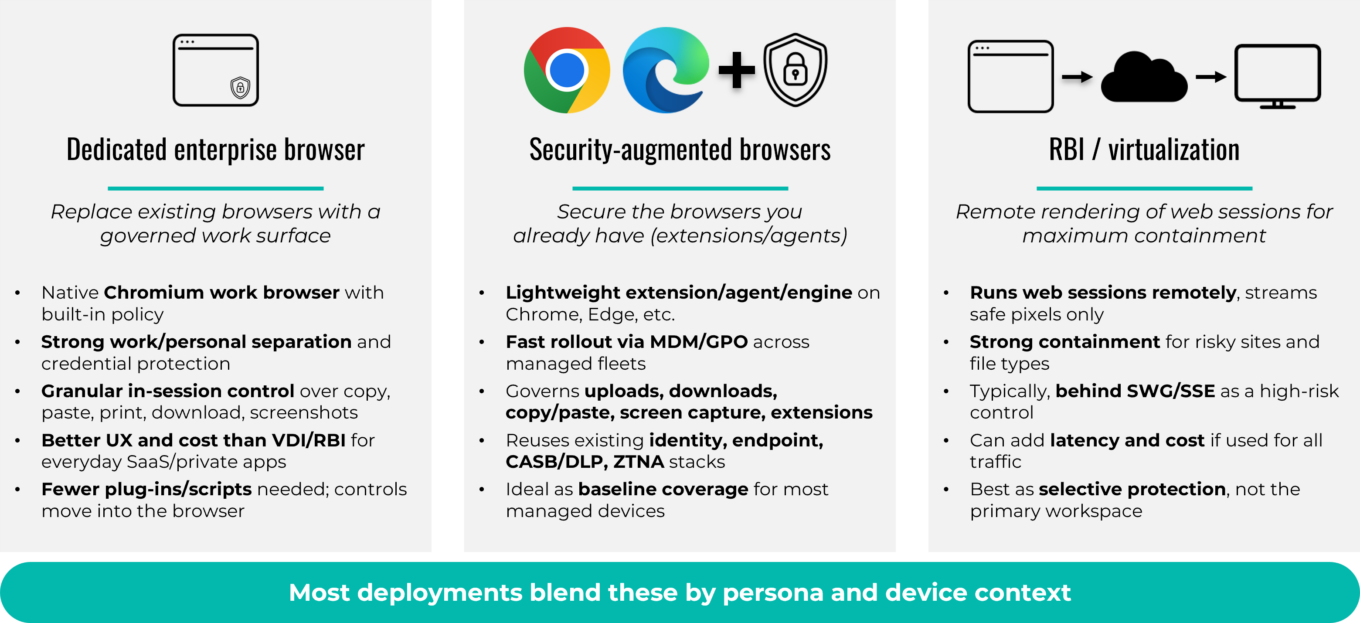
Enterprise browser security has matured into three primary architectural models: dedicated enterprise browsers; security-augmented browsers that add extensions and agents to Chrome, Edge, Firefox and Safari; and remote or virtualized isolation. Each model balances control, performance and operational effort differently, and most organizations use a blend of architectures rather than a single approach.
Before comparing them, it is useful to understand the technical foundation behind the dedicated enterprise browsers in this landscape.
Why dedicated enterprise browsers are built on Chromium
Nearly all dedicated enterprise browsers are based on Chromium, the open-source engine that underpins Chrome, Edge, Brave, Arc and many other modern consumer browsers. Chromium provides:
- Broad compatibility with modern SaaS and internal web applications
- Extension compatibility, including with legacy and internal plug-ins
- A predictable security-patch and release cadence (every four to eight weeks)
- Stable, optimized performance for web-centered workloads
- A familiar user interface and user experience that reduces training and adoption friction
Enterprise-browser vendors create modified versions of Chromium (Chromium forks), adding policy enforcement, identity isolation, posture checks, last-mile DLP, structured telemetry, selective isolation and optional AI usage controls. Chromium is used as the base version because it is the only broadly compatible path to governing how data is handled inside SaaS applications without breaking workflows or requiring application rewrites.
By contrast, security-augmented approaches do not involve creating modified versions of Chromium. Instead, they attach controls to whatever browsers are already deployed in an enterprise, most commonly Chromium-based Chrome and Edge, but also non-Chromium-based browsers such as Firefox and Safari.
Dedicated enterprise browsers
Dedicated enterprise browsers are derivative versions of Chromium built for work. They ship hardened by default with policy engines, zero-trust posture checks and last-mile DLP controls. Administrators can govern copy, paste, print and download actions by identity, device state and data classification without relying on endpoint agents or third-party plug-ins. Because the browser enforces policy natively, teams avoid many of the integration failures and compatibility issues (version drift) that occur when Chrome and Edge update faster than endpoint agents or security extensions can keep pace.
Performance and user experience are key strengths of dedicated enterprise browsers. A native Chromium environment feels familiar and avoids the latency and “double hop” issues common in VDI or full-time isolation.
These browsers typically integrate with SSO, endpoint posture assessment, and secure access service edge (SASE) frameworks, which helps unify telemetry and speed policy changes. They don’t obviate the need for some traditional security operations. Policy models need to be tuned as new SaaS applications and workflows appear. Telemetry paths must remain healthy, and update and rollback processes need to be tested so changes do not disrupt users. Most organizations will likely still depend on an existing security operations center (SOC) or equivalent operations function to monitor alerts, investigate high-risk events and support incident response; however, they do not need a separate team dedicated solely to the browser. Customers should designate a clear owner for the enterprise browser program and define how responsibilities are split across security, identity and end-user computing (for example, who owns policy identity integrations and who owns deployment and support).
A final operational consideration is how each vendor manages its Chromium derivative over time: how frequently they release updates, how quickly they patch critical Chromium vulnerabilities, how transparent they are about the changes, and what staging and rollback options they provide so enterprises can safely test and deploy new versions.
Security-augmented browsers (extensions, agents)
As noted, security-augmented approaches add lightweight extensions and thin agents to enterprises’ existing browsers (typically Chrome, Edge, Firefox and Safari) to provide last-mile controls and visibility rather than replacing them with a dedicated Chromium fork. This model enforces in-tab behavior controls on functions such as uploading, downloading, copying, pasting, screen captures and extensions, and it integrates cleanly with identity and endpoint management tools.
The appeal is rapid rollout and user familiarity. Teams can deploy these extensions and agents across managed device fleets quickly through mobile device management (MDM) or group policy objects (GPO), and users keep their preferred browsers. The tradeoff is that enforcement operates inside the browser sandbox, which limits some operating-system-level defenses, such as reliably preventing screen captures and local file exfiltration. Many organizations use this model on typical managed endpoints and then apply stricter controls for other devices such as BYOD and for high-risk user roles. Telemetry from extension-based models has improved over time, narrowing the historical visibility gap with dedicated browsers.
Browser parity is an additional consideration. Customers generally expect controls and policies to behave consistently across Chrome, Edge, Firefox, Safari and other browsers, yet these browsers sit on different engines and extension frameworks. Chromium-based browsers like Chrome and Edge share a common foundation. Firefox runs on the Gecko engine and implements a closely aligned but distinct WebExtensions model, and Safari relies on a WebKit-based extension architecture with its own packaging and permission rules. Vendors typically can support all of them, but maintaining feature parity and keeping pace with browser update cycles, especially on Safari, requires ongoing engineering and testing investment.
Browser security architectures
Source: First Analysis.
Remote browser isolation and virtualization
Remote browser isolation and virtualization was the earliest of the relevant architectures designed to contain web risk. Under this model, active content executes remotely, and the endpoint device receives a safe render stream. In principle, this is the most secure model because code never reaches the device. RBI can run in the cloud or on premise and is often paired with secure web gateways or proxies for broader in-line coverage or to extend inspection and enforcement across all web traffic, not just isolated sessions. The tradeoff is performance and cost. Continuous isolation consumes bandwidth, can add latency, and brings ongoing infrastructure expense. Modern platforms address this by applying isolation selectively based on destination, content type and user posture.
Virtual desktop infrastructure and desktop as a service are adjacent, rather than direct, competitors. They remain strong options for legacy applications that cannot run in a browser, but they cost more to operate and are now a fallback for SaaS-centric work.
Converging architectures in practice
In practice, these architectures coexist within enterprises. Organizations often harden managed devices with browser extensions, apply a dedicated enterprise browser where stronger controls or unmanaged devices require it, and turn to isolation only for the highest-risk destinations and file types. The decisions on what to use where involve considering user role, data sensitivity and operational fit. The priority is consistent policy across layers with unified identity, telemetry and DLP logic so users experience predictable controls wherever they work.
In most cases, no dedicated SOC sub-team is required solely for the browser. In organizations that already operate a SOC or equivalent security-operations function, the browser becomes another high-value telemetry source, and the SOC consumes its events just as it does events from endpoint, identity and network systems.
For organizations without a formal SOC, an enterprise browser does not remove the need to have a basic security operations capability. There still must be a team, internally or via a managed security service provider, that is accountable for monitoring alerts, investigating high risk events and responding to incidents. In these environments, the browser can simplify investigations by centralizing evidence at the session layer.
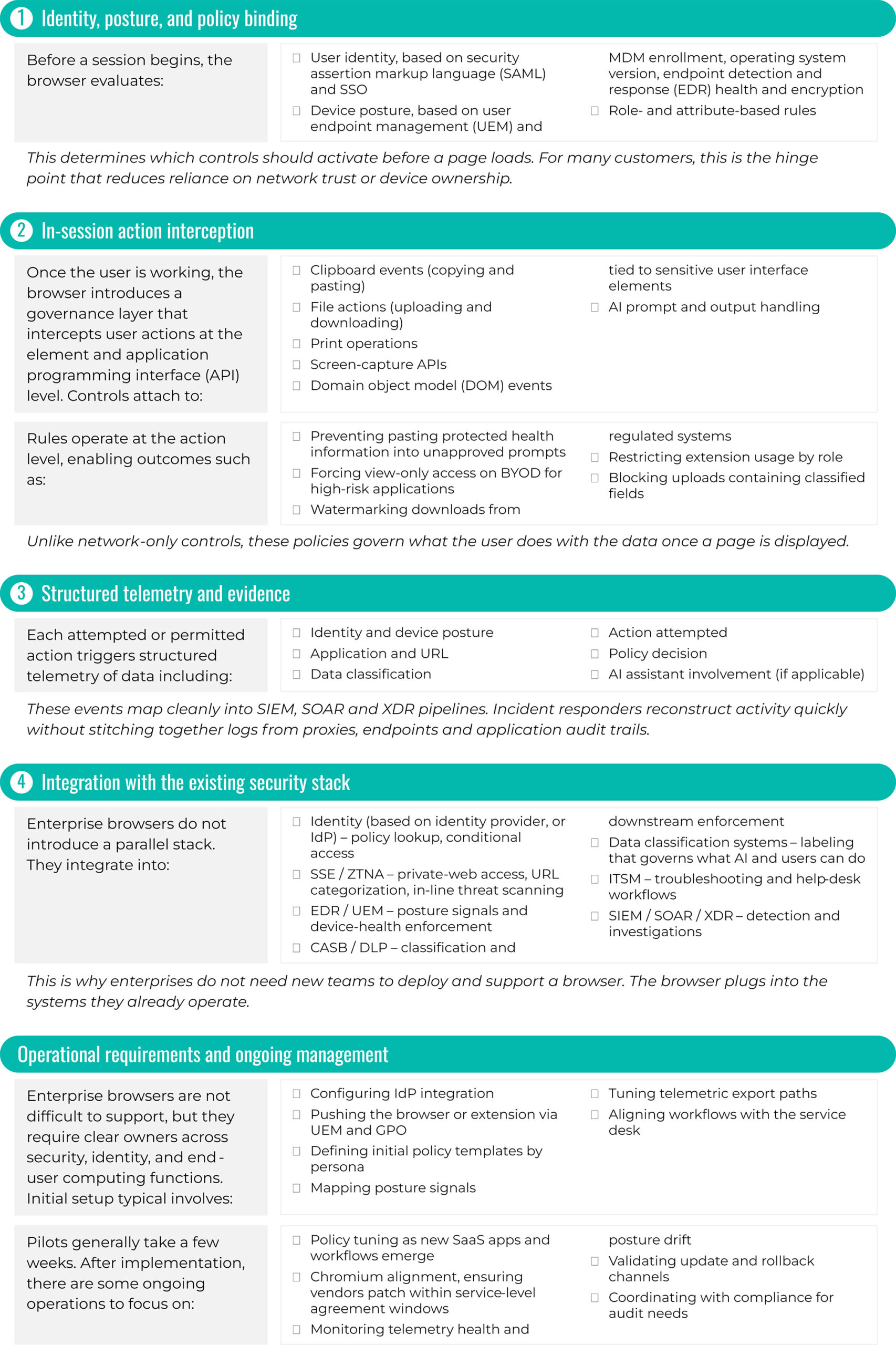
How enterprise browsers work (policy, enforcement and integration)
While the architectural models differ, they share a similar enforcement pattern: identity-aware, action-level policy applied inside the session, backed by structured telemetry and integrations with existing enterprise systems.
Source: First Analysis.
Beyond the browser boundary
Browser-centric controls do not eliminate the need to govern native and mobile applications. Many financial, healthcare and industrial workflows still rely on thick clients and mobile apps that sit outside the browser. In practice, customers pair enterprise-browser controls with MDM, UEM, EDR, and API- and gateway-level controls for those channels. The browser becomes the default control plane for SaaS and AI-driven work on laptops and desktops, while legacy and mobile applications continue to be governed through adjacent endpoint and network tools.
Session-level data flow: Where policy lives and what leaves the device
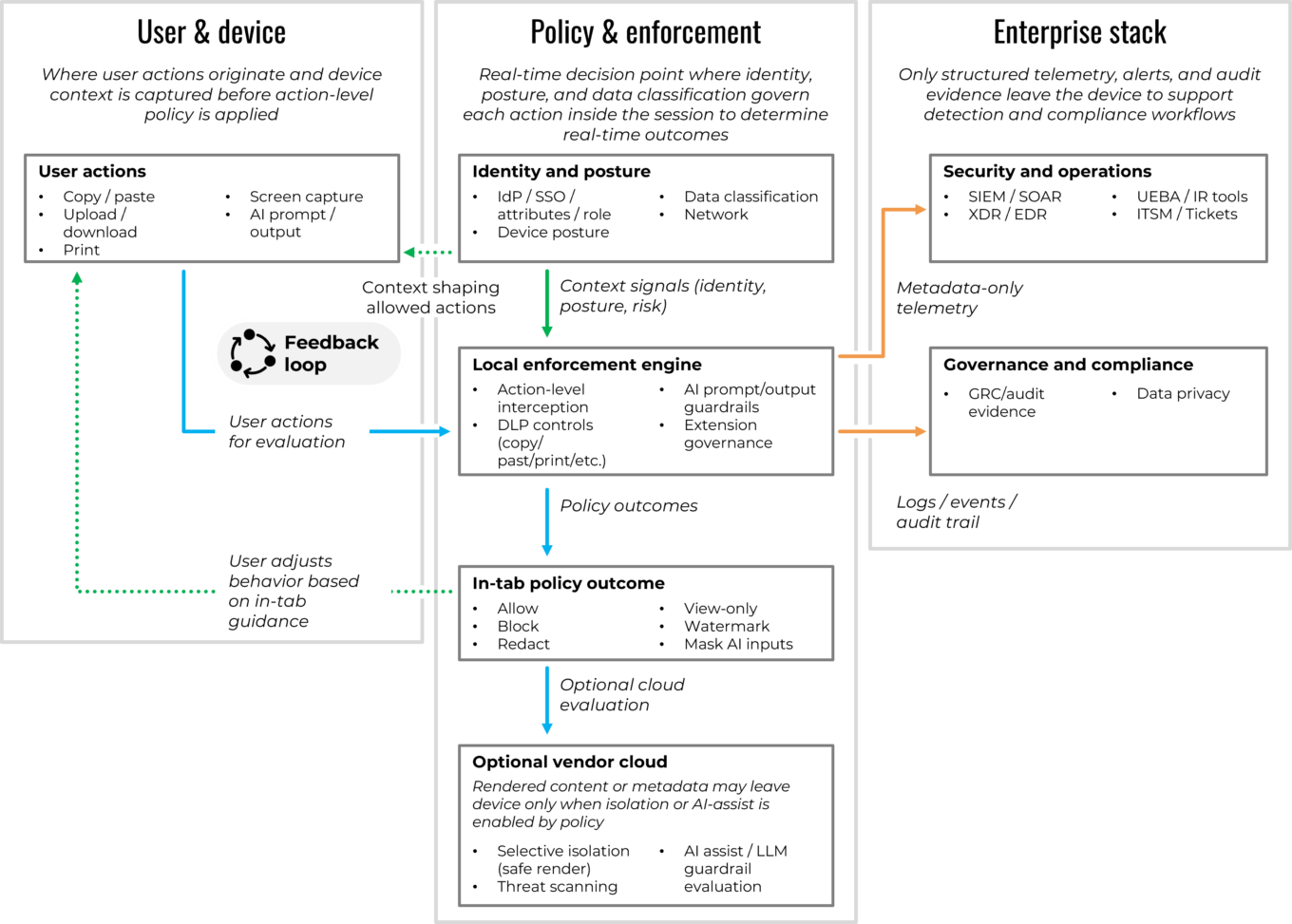
Source: First Analysis.
Economics, cost optimization and pricing levers
Once organizations understand the architectural choices, the financial picture becomes easier to evaluate. Each model has different implications for infrastructure cost, support load, and the operational overhead of maintaining legacy access paths, making economics the next natural lens in the evaluation process.
The economic case for an enterprise browser starts with a simple reality: Using VDI and heavyweight web gateways across every remote user is a poor fit for SaaS work, and not hardening and enhancing default browsers increasingly leaves gaps in governance, auditability and data handling. Many organizations today rely on Chrome and Edge with scattered plug-ins and manual controls. This status quo keeps licensing costs low but places a heavy burden on help-desk teams, security operations and compliance groups when last-mile controls fail or when AI-driven workflows introduce new obligations around data classification and audit trails.
This burden results from several factors inherent to the legacy approaches. Latency, fragile remote setups, profile drift (user profiles deviating from standards, which can trigger SSO loops and broken settings), printer redirection (mismatched drivers sending jobs to the wrong queue), and gateway timeouts (traffic backhauled through overlooked or distant secure web gateways and VPN egress points) mean more calls for help desk support. Periodic infrastructure hardware upgrades to keep up with capacity and signatures, and proxy hairpins (detours through centralized egress before returning to the same SaaS) add cost and fragility. Meanwhile, unmanaged browsers introduce hidden cost centers: inconsistent extensions, inconsistent logs for audit, brittle scripts for DLP, and dozens of exceptions paths for contractors, BYOD, and AI usage.
A governed Chromium workspace changes the cost curve. It preserves the familiar user experience while enforcing policy in the session, letting customers right-size or retire pieces of their VDI and VPN deployments and simplify the web path without sacrificing control. It also reduces the support and compliance overhead associated with unmanaged browsers. In doing so, it centralizes controls that otherwise would require a patchwork of plug-ins, scripts and manual steps.
VDI displacement: Category leader Island indicates an enterprise browser can reduce VDI needs by 80%-90%, lowering licensing and back-end costs as SaaS work shifts to the browser. Similarly, Palo Alto Network’s Prisma Browser cites up to 80% lower total cost of ownership versus VDI.
Offboarding efficiency: In a 2,000-employee customer deployment, Palo Alto Network’s Prisma Browser improved offboarding efficiency from six weeks to minutes, eliminating about 1,000 hours of offboarding ticket time and contributing to about 85% cost savings versus VDI.
Operational efficiency: Surf Security’s healthcare rollout cites about 20% lower operational costs after moving from VDI-heavy access to an enterprise browser model.
Workflow productivity: HERE reports about 40% gains in know-your-customer and anti-money-laundering task productivity when tasks run inside a unified enterprise browser workspace, including up to 85% fewer manual clicks and as much as 45 seconds saved per minute on repetitive steps.
Savings typically come from three areas. The first is displaced infrastructure and licenses. VDI is retained only for niche legacy applications. VPN concurrency drops for web-centric traffic, and proxy and secure web gateway complexity is simplified where in-line inspection is not needed for governed SaaS. The second is support and onboarding efficiency. When the browser becomes the governed workspace, offboarding and onboarding of new users accelerates and VDI-related tickets fall. The third is tool consolidation at the last mile: Native controls for copying and pasting, printing, watermarking, adding trust marks, governing extensions, and selective isolation shrink the stack of point plug-ins and brittle scripts that are costly to maintain. As teams reserve RBI for only the riskiest destinations and file types and rely on the browser for everyday SaaS, these savings compound alongside a cleaner support model.
Pricing is increasingly modular. Most vendors price per user with additional pricing elements for role-based tiers, add-ons for zero trust private application access, AI usage controls, and on-demand isolation (RBI or equivalent). Telemetry and export pricing usually scales with schema depth (richness and granularity of event fields) and retention (how long logs stay searchable). This modular pricing is especially useful when buyers want isolation to be selective and sensitive to usage. Elasticity of cost is important for buyers with contractor-heavy and seasonal workforces, and there is often a monthly or quarterly true-up to avoid paying year-round for seats used intermittently. In practice, buyers typically look beyond license cost alone, weighing direct cost offsets (for example, reduced VDI seats by persona, reduced VPN concurrency, or decommissioned appliances and maintenance) alongside conservative assumptions about productivity and support efficiencies.
Change management is the counterweight. Buyers also take into consideration the costs of switching to the browser-centric approach. These include the one-time effort for extension vetting and governance, role-based policy mapping, and concise training that highlights user-visible benefits (faster than VDI, fewer prompts via continuous authentication, clear “why” messages in-tab). Most programs plan to manage these costs with phased rollouts: third parties and BYOD users first, sensitive departments next, and then broader personas.
AI in the browser: Guardrails and embedded productivity
As organizations modernize their browser strategy for economic reasons, AI introduces a parallel driver: governance and embedded assistance. Nearly every emerging workflow now includes AI prompts, AI model outputs, and cross-application movement of data, making session-level AI controls the next layer of the browser story.
Because the browser is where users usually enter AI prompts, view output and move data between applications, AI has made the browser an even more critical part of everyday workflows. This both introduces new risks and creates opportunities to use the browser to enhance AI interactions. Adding governance and assistance for AI in the browser addresses these risks and opportunities, enforcing the rules in the session while giving users help that speeds up next steps. Usage is the foundation for these changes—enterprises need to define which AI models can be used, how sensitive inputs are handled and how AI-generated output can flow into downstream actions. Enterprises need “allow lists” for approved models, clear handling for confidential inputs and controls on how results are used.
AI governance and assistance inside the browser session
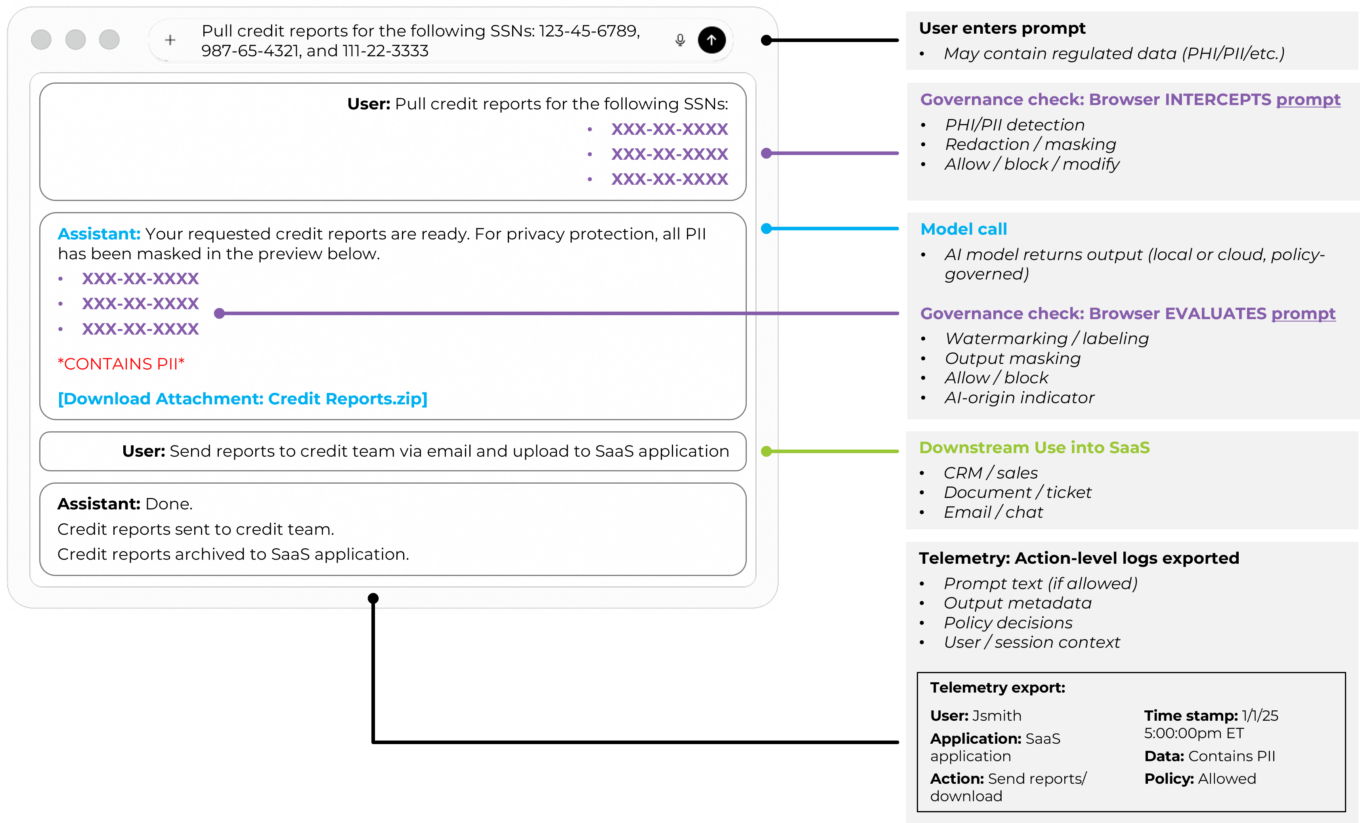
Source: First Analysis.
To address the new risks of AI, policies can block pasting regulated data into prompts, require redaction before submission, switch a view to read-only when sensitive records are open, watermark model-generated text, restrict downloads that contain classified fields, or require review before an AI-assisted export leaves a governed workspace. These controls work best when they are explainable within the browser tab itself. For example, showing in-line reasoning when an action is blocked and when they adapt to identity, device posture and the current application.
To address the opportunity for the browser to enhance AI interactions, embedded assistance can improve throughput without leaking data. In-browser copilots can draft emails from contact relationship management (CRM) records, summarize case notes, propose next actions inside a ticketing view and assemble cross-application context for approval. Value comes from placement and context as much as the model itself. When the AI assistant runs inside a governed session, it inherits policy for copying, pasting and downloading. It also inherits the user’s roles and the page state, which allows the assistant to warn the user before undertaking a risky action, to redact sensitive fragments, and to log each suggestion and acceptance for audit.
This approach reframes the browser from a pure security surface to a productivity platform with enforceable guardrails. Built-in functions such as password managers, organized tabs and one-click actions establish baseline efficiency. Policy-aware assistants then enhance productivity by turning the next step into a guided flow. The result is fewer context switches (less need to change browser tabs or applications in the middle of a workflow), lower manual effort for routine tasks and cleaner evidence for audits. However, effectiveness depends on integration depth. Identity and posture signals need to decide which AI features are available at any moment. Data classification then informs what can be sent to an AI model and what must be masked. Telemetry exports enable security operations and compliance teams to continue using their existing tools. The strongest implementations map these feeds into a single policy model so rules are consistent across SaaS, private applications behind ZTNA and embedded AI model calls.
A new wave of consumer “AI-first” browsers have emerged from large language model products that have effectively launched their own browsers, such as Perplexity’s Comet, ChatGPT Atlas and Arc Max. These browsers are designed around a built-in AI assistant, integrating it directly into the browsing surface to summarize and compare AI results, clean up tab sprawl and perform lightweight actions without forcing the user to switch into a separate chat window. Comet is free because Perplexity’s business model relies on search-style advertising economics and referral and affiliate revenue from answer-linked citations, similar to Chrome’s alignment with Google search, which allows the browser to be optimized for speed, convenience and discovery rather than enterprise controls. The enterprise browser opportunity is to meet the same usability expectations while delivering the enforceable controls, audit trails and data-handling guarantees that consumer AI experiences leave out.
Ideally, the AI assistant should reside where work happens and respect policy end-to-end. The control layer must be precise enough to stop risky actions without slowing normal work, and audit trails should capture prompts, context, decisions and outcomes in a structured, searchable format. Vendors should demonstrate both control and efficiency: clear examples of blocked or redacted behavior and measurable gains on real workflows. When those conditions are met, AI in the browser doesn’t represent a parallel system that introduces new security blind spots. Rather, it reduces risk and improves throughput. In the outlook section below, we discuss how these mechanics shape AI’s long-term role in the enterprise workspace.
Deployment patterns and customer segmentation
With AI and session controls defined, the practical question becomes how to deploy these capabilities. Rollouts vary widely based on device mix, BYOD exposure, risk appetite and organizational culture.
Deployment follows a few consistent patterns as customers balance security, user experience and operational fit. How organizations segment devices, roles and risk levels dictates in what situations they deploy dedicated work browsers or browser extensions and how quickly legacy access models can be reduced. The themes below appear across nearly every successful rollout.
Managed and unmanaged devices: Early wins appear where an organization cannot rely on device control to ensure security. Contractors, partners and M&A transition teams often work on unmanaged hardware. A governed work session delivers consistent policy and telemetry without requiring full device enrollment. For managed fleets, organizations typically start with extension-based controls as base-line protection and then add a dedicated work browser for roles that handle sensitive data or require stronger last-mile DLP. Over time, this creates a natural split between “managed corporate device” and “user- or partner-owned device,” even when the policy model is shared.
Segmentation by size and culture: Large organizations usually segment by persona and risk tier. Organizations that prioritize security are more willing to standardize on a dedicated work browser for contractors, offshore teams and regulated departments while leaving extensions in place for general employees. Mid-market customers often prefer a single control plane that runs across Chrome, Edge, Firefox and Safari, with a small set of exceptions for legacy applications or highly sensitive workflows. Organizations that embrace technology as a key business driver place a premium on user experience and will accept stronger controls when the rollout includes visible speed gains and fewer prompts.
Replace or augment: Against that backdrop, two broad deployment patterns emerge. Some teams make a dedicated work browser the norm for specific personas, such as customer-facing roles and high-risk departments, and expand from there. Others focus on hardening the browsers already in use with extensions and agents and reserve a dedicated work browser for only the highest-risk users and use cases. The first pattern emphasizes clear separation of personal and corporate activity with a standard work surface. The second emphasizes rapid coverage and user familiarity with managed fleets. Most programs land in the middle, mixing these approaches and aligning them to the device landscape and risk appetite described above.
Change management and path to scale: A clear sequence of use cases with measurable outcomes is the decisive factor in successful adoption. Teams commonly start deployment among third parties and BYOD users, then move to sensitive departments, and finally cover broader personas. Short training and in-tab “why” messages reduce help-desk load and pushback. Extension governance is verified early. Policy templates are tuned by role and data type. Update cadence and rollback options are tested before broad release so patching does not introduce instability.
What good looks like: Strong deployments publish a short list of personas, the controls each receives, and milestones for retiring or reducing legacy infrastructure. They show how the browser separates personal and corporate contexts and how policy follows the user across SaaS and private applications. They measure reductions in support tickets and onboarding speed improvements and produce clear evidence for audits. The result is consistent session-level control that matches risk, preserves user experience and scales without heavy operational overhead. These patterns, in turn, shape how customers evaluate different solutions in practice.
To assess impact based on metrics, customers often track a small set of browser-program key performance indicators:
- Time to onboard and offboard a contractor or partner, from request to first or last login
- VDI and VPN concurrency before and after rollout, segmented by persona
- Browser- or VDI-related help-desk tickets per 100 users per month
- Percentage of high-risk workflows covered by in-session policy (for example, protected health information access, know-your-customer and anti-money laundering reviews, and administrative console changes)
- Number of investigations that require reconstructing activity from network logs alone; this should decline as action-level browser telemetry matures
These metrics make it easier for security, IT and finance to test assumptions, calibrate rollouts and report progress to executives and boards.
Privacy, monitoring and works-council constraints: Enterprise-browser telemetry is powerful enough that it can start to look like monitoring if it is not framed correctly. European works councils, privacy offices and human resources teams often scrutinize session-level logs that show individual user actions, even when the logs’ intent is purely for security. Successful programs draw a clear line between security evidence and performance surveillance, document when and how user-level views are accessed, and emphasize aggregated reporting wherever possible. Making those guardrails explicit early in the rollout reduces friction with internal stakeholders and avoids delays in regions where employee-monitoring laws are more stringent.
Program ownership and stakeholder alignment: Successful programs have a clear owner and a small set of committed partners. In larger organizations, ownership often sits with security teams or end-user computing teams, with formal input from identity, networking or SSE, endpoint, IT service management and compliance teams. Together, they define the shared policy model, run pilots with representative personas, and agree on how browser telemetry feeds incident response and audit. Without this structure, browser controls risk becoming another point solution. With it, the browser becomes a coordinated part of the zero-trust and digital-workspace strategy rather than a parallel track.
Common reasons for failure: The most common reasons for failure are organizational and behavioral rather than purely technical. On the operational side, neglecting update cadence and rollback planning can leave organizations several Chromium versions behind, which creates growing compatibility issues and an avoidable security risk. On the user side, heavy or unpredictable controls can prompt users to evade them by moving work to personal browsers, forwarding files to personal email or adopting unsanctioned SaaS tools and extensions. This “shadow IT” behavior increases risk and erodes the value of the program the browser was meant to strengthen. Poor change management, limited communication about benefits and inconsistent policies across device types contribute to this problem. While modern security programs increasingly try to block the workarounds, recognizing and correcting underlying problems early helps teams design rollouts that keep users on the governed path and remain stable over time.
Evaluation checklist: How customers compare options
Deployment patterns shape how customers run evaluations. With practical constraints and persona requirements defined, organizations compare offerings using a predictable set of criteria that determines usability, fit and long-term viability. Most evaluations converge on the same set of questions: how deep the controls are, how the product feels to use, how well it fits the existing technology and security stack, and whether the financial case holds up once assumptions are tested.
Security depth: Security teams start by looking at last-mile control and anti-tamper posture. They ask how precisely the product can govern copying, pasting, printing, downloading, clipboard access, screen capturing and extension behavior by user, device posture and data classification. They also evaluate safe-browsing and isolation features, such as how the product handles sites known to be malicious, risky categories and high-risk file types. They assess whether credential isolation keeps work identities separate from personal logins and whether phishing-resistant authentication is supported in practice, not just on paper. They also verify tamper resistance: how easy it is for an authorized user or bad actor to disable controls, remove an extension, or circumvent a policy, and what options exist for administrators in case of a failure.
User experience and performance: Adoption depends on how the solution feels to users in their day-to-day work. Customers measure start-up time, page-load performance and behavior under realistic conditions such as heavy tab usage, video conferencing and file-heavy workflows. Extension compatibility is another focus, especially for internal or niche tools that users rely on. Teams also test screenshot behavior and how the solution behaves when the host device is offline to understand what happens at the edge of connectivity. Look and feel matter as well. Users expect a familiar Chromium-grade browsing experience, consistent keyboard shortcuts, predictable tab behavior and minimal visual drift from the browsers they already use. Even small interface friction like unexpected prompts, altered menu flows and layout shifts can affect adoption. The expectation is that controls operate quietly in the background and surface only when policy decisions are needed.
Operations and telemetry: Operational teams evaluate the policy model, update mechanics and telemetry quality. They want clear service levels for updates, visibility into how quickly critical vulnerabilities are patched and safe options for staging and rollback. On telemetry, they examine the event schema, the volume and granularity of data and how well it maps into existing SIEM and SOAR tools. Posture checks, alert routing and incident workflows should fit into current processes rather than creating a separate process just for the browser.
Compliance and governance: Compliance and risk teams focus on auditability and data handling. They assess how action-level logs capture who did what, in which application, on which device posture and with what policy outcome. They check log retention options, data residency and how evidence is produced for audits and regulators. Certifications and control mappings, such as the American Institute of Certified Public Accountants’ System and Organization Controls 2 (SOC 2) and sector- or geographic-specific frameworks like the U.S. Health Insurance Portability and Accountability Act and Europe’s General Data Protection Regulation, provide additional assurance that the solution can support regulated environments without extensive customization. They also press for transparency on data paths: where policy is evaluated, what user or content data leaves the device, whether it is retained or used to train models, and how those flows align with internal data-handling and data-rights policies.
Integrations: Integration depth often determines how fast a deployment can move and how much value users see. Customers test binding with identity providers and SSO, endpoint security tools, CASB and DLP platforms, ZTNA and SSE for private-application access, and MDM or UEM for device management. They also look at service-desk integration so policy decisions and user issues appear in ticketing systems with enough context to act. Increasingly, browser solutions integrate directly with the SaaS systems where day-to-day work happens:
- Contact relationship management and customer systems: Salesforce, HubSpot
- Ticketing and operations: ServiceNow, Zendesk, Jira
- Productivity and collaboration: Microsoft 365, Google Workspace, Slack, Teams
- Back-office platforms: Workday, NetSuite, SAP, ADP
These integrations enable in-context shortcuts, workflow automations and AI assistants that understand page state and user role. The goal is a browser control plane that aligns with both the security stack and the business applications users live in every day, rather than an isolated component.
Economics and licensing: Finance and procurement teams translate the technical story into unit economics. They examine licensing constructs, including per-user or per-role pricing, ZTNA and AI-control add-ons, isolation metering and log retention tiers. Most vendors do not publish full pricing calculators, but customers increasingly expect enough detail on tiers, add-ons and logging options to support practical budgeting and what-if analysis. They compare these to the cost of infrastructure the solution is expected to displace, such as VDI seats, VPN usage, proxy capacity and legacy plug-ins. They also compare them to savings expected from reduced support load. A credible model reflects both direct offsets and conservative assumptions about productivity gains and allows for elasticity where contractor or seasonal headcount fluctuates.
Interoperability and lock-in: As browser controls deepen, interoperability and lock-in questions are starting to surface. Customers want to know how portable policy models and telemetry schemas are if they change providers, how much of their investment in integrations will carry forward and whether policies can be expressed through open APIs or policy-as-code frameworks rather than only inside a proprietary console. Vendors that make these boundaries clear and expose flexible integration paths will be better aligned with security teams that design for long-term resilience rather than a single product cycle.
Roadmap and vendor risk: Finally, customers consider roadmap risk and vendor durability. They ask how closely the product tracks the official Chromium version and how it handles ongoing browser-platform changes, including Chrome’s Manifest V3 and Privacy Sandbox updates, which tighten what extensions can see and do. They also look at how feature work is prioritized among security, productivity and AI governance, and at the vendor’s financial position, pace of releases and customer references in similar environments. Preferred vendors are those that can sustain update cadence, keep up with browser-platform changes and support a multi-year transition away from legacy access models.
The strongest candidates combine reliable last-mile control, a user experience that holds up under real workloads, deep integration with identity, SSE, endpoint, IT service management and core SaaS applications, and a clear financial case, while leaving room for AI-assisted workflows to grow inside the same governed browser workspace.
The browser as the operational control plane for zero trust
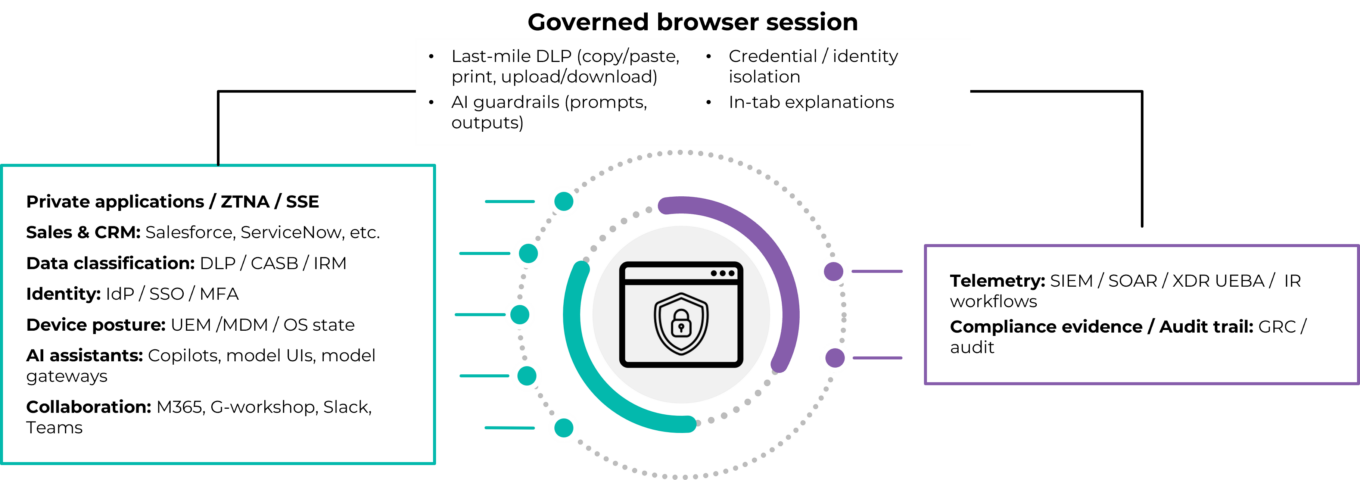
Source: First Analysis.
Outlook: How the market will develop
The enterprise browser market is moving from an early experimentation stage into a stage of more structured deployment. Most of the core capabilities needed now exist. This next phase will likely revolve around platform alignment, economic justification and execution: who can tie browser-level control into the rest of the stack, unlock measurable productivity gains and keep pace as Chromium and key SaaS applications evolve.
Platforms extend into the browser
Large security vendors are steadily pushing their policies closer to where work happens. Identity, SSE and endpoint providers already sit in the critical path for user access, and they are adding browser-focused features that extend those controls directly into browser sessions. For many customers, this creates a natural pull toward enterprise browser solutions that are aligned with existing security platforms, particularly when they are already standardized on a security or networking stack.
Independents define the category
Independent enterprise browser and browser-security vendors are defining the category from the product outward rather than building off a broader security platform. They tend to share a few traits: a primary focus on last-mile DLP and session governance; a neutral stance across identity, SSE and endpoint stacks; and frequent improvements aimed at optimizing AI usage controls and user experience. As these offerings mature, they set practical standards for policy models, telemetry depth and assistant behavior that often prompt larger platforms to develop or acquire similar solutions.
Over time, we expect this to sharpen the line between consumer and enterprise use. Chrome, Edge, Firefox and Safari will remain general-purpose browsers. Enterprise offerings, whether independent or part of a broad security vendor platform, will be judged not on the browser rendering engine, but on policy depth, integration coverage and how naturally they fit into day-to-day workflows.
Security and productivity converge in the session
Enterprises’ need to address security risks have driven most early enterprise browser purchases, especially for their BYOD users, contractors and regulated departments. Over the next several years, however, the need to improve productivity is likely to become a significant driver of enterprise browser purchases. As the browser becomes the primary workspace, session-layer zero-trust and in-context assistance sit on the same foundation.
Controls such as continuous authentication, posture-aware policy and credential protections lower risk, while policy-aware assistants reduce clicks, shorten the time it takes to process customer and employee requests, and improve the quality and consistency of outcomes. Customers will look for evidence on both sides: fewer security incidents and near misses, and tangible throughput gains in core workflows.
VDI shrinks, RBI becomes selective
Virtual desktop infrastructure and full-time remote browser isolation are unlikely to remain the default for web-centric work. Their operational overhead and user-experience impact are difficult to justify once a governed Chromium workspace or hardened native browser can secure most SaaS and private web applications. VDI will likely persist for legacy applications that cannot be delivered in a browser. RBI will likely remain important for the highest-risk destinations and file types where full isolation is warranted. The day-to-day pattern is more likely to be enterprise browsers or extensions for most traffic, with isolation applied selectively.
Pricing becomes more modular and role-based
Licensing is already drifting toward role-aware and feature-aware models. Core coverage is typically priced per user, with add-ons for ZTNA to private applications, AI usage controls, and on-demand isolation attached to specific personas. Log retention and telemetry depth are being treated as separate pricing drivers so that security operations can select the options most appropriate for their investigative needs. We expect customers to formalize this into role catalogs: structured lists of user personas, the controls each persona receives, and which legacy tools those controls replace (VDI, VPN, proxies and browser plug-ins). Vendors that clearly map pricing to these role-based bundles, and to the legacy costs they offset, should have an advantage with finance and procurement teams.
M&A and ecosystem pull
Consolidation is likely to continue as larger platforms look to complete their zero-trust and AI governance offerings. The companies they target to acquire will likely have offerings that feature session-level DLP, AI usage controls, browser telemetry and extension governance and that are proven in regulated or public-sector settings. This creates two clear paths for enterprise browser companies: become a strategic acquisition that fills a gap in a broader platform or become a preferred ecosystem partner that plugs into several platforms at once.
In either case, it’s critical that enterprise browser companies’ offerings participate in the broader IT ecosystem, as adoption will hinge on how well they plug into identity, SSE, EDR, IT service management and core SaaS systems. Enterprise browsers and extension platforms that integrate cleanly with these reference architectures should benefit from existing buyer patterns, regardless of whether or not they are part of a broad enterprise software platform.
Over time, we expect browser-level control to move from a targeted solution for higher-risk environments to a standard element of zero-trust design as more work and more AI-driven workflows originate in the browser. Whether browser-level control arrives as a module within a broader platform or through a tightly integrated independent vendor, session-level governance is set to play a central role in how organizations secure and streamline everyday work.
AI in the browser becomes the workspace
As organizations modernize the browser for economic and operational reasons, AI introduces a parallel driver of change. The browser is where users enter AI prompts, review AI output and push AI results into downstream systems, making it the natural place for both risk controls and throughput gains. Looking forward, we expect the browser’s prominence as the workspace for AI to become even more pronouced. Copilots are evolving from helpers inside applications to an orchestration layer across CRM, ticketing, collaboration and back-office systems, but they still need a consistent surface for identity, posture and data-handling policy. The browser is the natural candidate. A browser-native environment can apply zero trust-policy, DLP rules and telemetry consistently to both human actions and AI-assisted actions, giving security and compliance teams a single control plane for prompts, context and outputs. Consumer-grade chat interfaces and plug-ins may remain attractive for experimentation and light research, but they lack the session-level governance required for regulated or sensitive workflows.
For vendors, this implies AI roadmaps will be judged less on raw model capability and more on how well assistants are embedded into real browser workflows while respecting policy, reducing process steps and leaving clean evidence behind. For customers, it means AI strategy increasingly intersects with browser strategy. The choice of enterprise browser or security-augmented browser will shape how far AI can reach into core processes without creating new blind spots. Over time, we expect the most successful offerings will be those where users experience AI as a natural extension of their governed browser workspace rather than a separate destination they must visit.
Update cadence becomes critical
Alignment with official Chromium is already a basic requirement, and it is becoming a key evaluation criterion. Customers increasingly ask what is the median time lapse between official Chromium releases and corresponding updates of vendors’ enterprise browsers. They also ask how vendors handle critical common vulnerabilities and exposures and about the availability of safe staging and rollback channels. Extended delays in patching or compatibility can introduce security risk and increase IT support calls. Vendors that can demonstrate a predictable, well-documented update process are better positioned in larger and more-regulated environments.
User experience and integration depth will be the primary drivers of success
Taken together, these forces, including platform pull, AI integration and shrinking reliance on legacy access, illustrate the many dimensions customers and vendors now weigh when shaping their browser strategy. There will always be use cases where the importance of control justifies heavier user experiences and narrow user choice, and in those cases, we think enterprises will continue to rely on stricter models, including VDI and full isolation for specific applications and users. However, the bulk of the market is shifting toward solutions that feel natural to use and fit cleanly into existing tools.
In practical terms, the browser is becoming the enforcement point where zero-trust principles meet day-to-day work. Identity, device posture, data classification and AI assistance all converge in the session, and the controls that matter most for SaaS and AI model access now live at that layer. Endpoint, network and identity tools remain essential, but the browser is increasingly where access decisions, data-handling rules and user guidance are applied in real time.
For customers, this means user experience and integration depth will decide most outcomes. A dedicated work browser or hardened native browser must launch quickly, load pages predictably and preserve familiar functions such as extensions and keyboard shortcuts where possible. At the same time, it needs to plug into identity, SSE, endpoint security and IT service management and interact intelligently with the SaaS systems where work happens. Those SaaS systems include CRM, ticketing, productivity, collaboration and back-office platforms as well as embedded AI assistants that help users move faster. Customers are increasingly looking for a single, governed workspace that reduces context switching, exposes clear in-tab explanations for policy decisions, and delivers clean telemetry into their existing security and operations stack.
Based on our research and our conversations with vendors, we believe the enterprise browser offerings most likely to win broad adoption will be those that combine strong controls with familiar user experience and deep integration into existing identity, SSE, endpoint and SaaS environments: in other words, those that users do not have to think about each day and that security and operations teams can manage without adding disproportionate complexity. Over time, we expect these attributes to be associated with improved productivity and operational simplicity, which will become the primary reasons organizations standardize on a browser workspace. Security will be the baseline requirement rather than the only differentiator. In this context, the strongest offerings will combine reliable last-mile control, acceptable performance under real workloads and straightforward financial impact tied to displaced infrastructure and reduced support load. They will also leave headroom for AI-assisted workflows to grow inside the same governed sessions and boost productivity.
Vendor highlights
The following section profiles a representative set of vendors across the major architectural models in this market, including dedicated enterprise browsers, security-augmented solutions delivered through extensions and agents, and emerging agentless and engine-based platforms. The landscape is crowded for a category at this stage of maturity. Across these vendors, more than 90 institutional investors have participated in funding rounds, with over $1.2 billion dollars raised collectively. The breadth of firms investing in the space and the diversity of architectural approaches underscore both the large scale of the opportunity and the investment community’s high level of conviction.
Dedicated enterprise browsers
HERE
HQ: New York, N.Y.
Founded: 2010
Total funding: $98 million
Investors: Bank Capital Ventures, Bank of America, Barclays, CME Ventures, CTC Ventures, HSBC, ING Ventures, In-Q-Tel, JPMorgan Chase, Pivot Investment, SC Ventures, Tribeca Early Stage Partners, Wells Fargo

Company overview
Formerly known as OpenFin, HERE spent years providing a workspace and desktop interoperability platform for financial and other process-heavy teams. Along with the name change to HERE, the company expanded that foundation into a zero-trust managed enterprise browser for work applications. HERE pairs security controls with a workflow-guided productivity layer for process-heavy teams (for example, financial services, call centers and healthcare). Notable features include an AI Center for in-context enterprise AI, Supertabs and SuperSearch to tame tab sprawl and unify search, and Signals for cross-app state sharing. In addition, it offers dashboards, interoperability hooks, centralized notifications and app-level restrictions that reduce re-keying and support AI adoption. Its interoperability heritage positions HERE to orchestrate multi-application workflows more deeply than typical enterprise browsers.
First Analysis commentary
HERE’s managed-workspace model delivers meaningful productivity gains across browser-based SaaS. The browser focuses on three outcomes: in-browser security, workflow productivity and greater AI adoption. Evidence from regulated customers (for example, financial services and call centers) points to hard, desk-level return on investment such as faster handling times and less re-keying, building on a long-standing footprint and investment from major financial institutions. Differentiation rests on its ability to orchestrate multi-application workflows and AI assistance across the workspace, not just embed an AI sidebar in a single browser. Sustained value will hinge on expanding integrations with core SaaS systems and enterprise AI connectors and proving repeatability in additional regulated and process-heavy sectors beyond the current verticals in the company’s sweet spot.
Island
HQ: Dallas, Texas
Founded: 2020
Total funding: ~$730 million
Investors: Alta Park, Canapi Ventures, Capital One Ventures, Citi Ventures, Cisco Investments, Coatue, Cyberstarts, Evolution Equity, Georgian Partners, Geodesic Investments, Goanna Capital, G Squared, Harbert, Insight Venture, J.P. Morgan Growth Equity, NewView, Prysm Capital, Sequoia, ServiceNow, Squarepoint Capital, Stripes

Company overview
Island pioneered the modern enterprise browser, built to secure and manage the last mile of user interaction with SaaS and private web apps. The solution delivers unified last-mile controls and rich per-action telemetry for governance, audit and incident response and is deployed at scale in regulated sectors with complex customer needs. Customers use Island to standardize a secure work surface for employees and contractors, enforce SaaS policy, support BYOD use and peel any user application (web or thick applications) workflows off VDI and VPN. A managed extension projects controls onto existing browsers for managed devices, and stronger isolation can be applied selectively for high-risk users, sites and actions. Differentiators include comprehensive native capabilities that reduce point tools, strong administrative user experience and an increasing focus on AI-powered productivity features (Island AI, workflow automation, in-browser assistants) that aim to reduce manual, repetitive work. Island remains platform agnostic as an independent, best-of-breed browser rather than a bundle within a larger SASE or endpoint suite.
First Analysis commentary
Island is the most mature and broadly deployed enterprise browser, with strong traction among regulated and security-led buyers that need unified last-mile controls. Its depth across security, SaaS governance and selective isolation positions it as a credible replacement or major offset to VDI and VPNs for browser-heavy workflows and supports total cost of ownership and tool consolidation arguments. Island also supports the full range of enterprise browser architectures (full browser, managed extension, and selective isolation). Independence from any single SASE or endpoint platform is a strategic advantage in heterogeneous environments. Beyond security, Island’s push into AI-driven productivity and workflow automation is an important vector, with the potential to reduce manual tasks, re-keying and investigation effort at the desk level. Key watch points include maintaining product velocity in workflow and AI features, expanding beyond early regulated strongholds, and consistently demonstrating measurable return on investment in both productivity and VDI and VPN displacement. Overall, Island’s maturity, breadth and operational simplicity underpin its leadership in best-of-breed enterprise browsers.
Mammoth Cyber
HQ: Palo Alto, Calif.
Founded: 2019
Total funding: $8 million
Investors: 500 Global, Alumni Ventures, Cyber Mentor Fund, First In Capital, LDV Partners, Silicon Valley Future Capital, TSVC, Taiwania Capital

Company overview
Mammoth Cyber offers a Chromium-based enterprise browser that embeds its policy engine directly in the browser to secure access to SaaS, public cloud and private web apps, often without a VPN. It targets remote workers, contractors and unmanaged devices with a zero-trust, continuously authenticated workspace, positioning the browser as a single secure workspace. Mammoth takes a privacy-focused stance with no customer data stored by Mammoth, while supporting governed file workflows across both cloud storage and traditional server message block (SMB) network shares, such as shared Windows “S:” and “G:” drives many enterprises still rely on. This lets security teams apply consistent policy to files whether they live on legacy file servers or modern SaaS repositories. Recent positioning emphasizes an “Enterprise AI Browser,” with native AI agent integrated in the browser. This strategic shift helps protect internal data while seamlessly enabling AI assistants in business workflows. Enforcement is local and endpoint-native (document object model plus deeper device integrations) to reduce latency, preserve user experience and extend protections into workflows that go beyond the browser alone. The company was previously known as Appaegis.
First Analysis commentary
Mammoth is an earlier-stage but credible challenger for organizations that want to tighten browser- and endpoint-level zero-trust controls without adding VDI or heavy VPNs, potentially at a more cost-efficient price than larger platforms. Its policy-in-the-browser architecture, with endpoint-native integration and support for existing storage such as SMB shares, is well suited to environments that depend on shared drives and on-premise file servers alongside SaaS. That makes it a pragmatic fit for mid-market and cost-conscious enterprises that want enterprise-browser capabilities without fully re-architecting around a SASE edge or proxy-only model. The privacy-focused design with no vendor-side data storage should resonate with regulated buyers and others with sensitive data, while the AI-focused positioning and guardrails align with rising concern over “shadow AI” and inadvertent data exposure to AI tools. Key steps will be scaling beyond early adopters, demonstrating return on investment via VDI and VPN reduction and AI-risk mitigation, and deepening integrations with identity, EDR, SSE and SASE ecosystems.
Prisma Browser
HQ: Tel Aviv, Israel
Founded: 2021
Total funding: $126 million
Investors: Accel Partners, Alpha, Ballistic Ventures, CrowdStrike (CRWD), Evolution Equity, Merlin Ventures, Sorenson Ventures, SYN Ventures, Team8 LabsInvestors: Accel Partners, Alpha, Ballistic Ventures, CrowdStrike (CRWD), Evolution Equity, Merlin Ventures, Sorenson Ventures, SYN Ventures, Team8 Labs

Company overview
Palo Alto Networks (PANW) acquired Tel Aviv-based Talon in December 2023 for roughly $550 million and is evolving it into Prisma Browser. It is a security focused workspace designed to secure BYOD and contractor access on any endpoint, isolating work activity from the operating system while applying consistent browser-layer controls. The browser ties natively into identity and Prisma SASE (URL filtering, enterprise DLP, CASB, autonomous digital experience management), keeping policy, access and telemetry unified. Backed by Palo Alto’s threat intelligence, go-to-market scale, and bundling opportunities across SASE and next-generation firewall renewals, the product is often positioned as a faster, more affordable alternative to VDI for web-centric workflows. While the functionality is appropriate on a standalone basis, Palo Alto’s go-to-market efforts are focused on deeper penetration within its existing customer base, extending SASE capabilities to unmanaged devices.
First Analysis commentary
Prisma Browser is a strong fit for Palo Alto-standardized environments and for teams seeking to retire or offset VDI and VPNs for web-centric workflows. Reported reductions in VDI spend and operational complexity reinforce the value case, while tight integration with Prisma SASE helps unify policy, telemetry and access in a way standalone browsers cannot. From a pricing standpoint, Prisma Browser is generally at the higher end of the enterprise browser market when evaluated on its own, but the economics improve meaningfully when it is bundled into broader Prisma SASE or next-generation firewall agreements and positioned as a replacement for legacy remote access and VDI. Platform heft remains a major advantage: Palo Alto can drive adoption through SASE and next-generation firewall bundling, enterprise license agreements and partner channels, though this risks framing it as an add-on rather than a workspace with distinct standalone value. Key watch points include balancing control with end-user performance, how AI and data-governance features mature relative to more AI-focused peers, and the product’s strategic clarity within the broader Palo Alto platform. Continued expansion of SaaS and AI integrations will be important to sustain cross-application efficiency gains and competitive momentum.
Surf Security
HQ: London, U.K.
Founded: 2021
Total funding: $7 million
Investors: 11.2 Capital, Mango Capital, Okta Ventures

Company overview
Surf Security is an early-stage enterprise browser that emphasizes identity and user experience design. It deploys as a full browser on unmanaged devices and as a lightweight extension on managed endpoints. Enforcement is on device, combining zero-trust controls, extension and web governance with step-up MFA, local isolation and sandboxing at the content layer, and granular web filtering without breaking TLS. It includes hardening features such as process monitoring, on-page sanitization, device-posture scoring, session revocation and optional sandboxing for downloads. The result is a single, user-friendly workspace for SaaS-heavy, distributed work and BYOD or contractor access that can reduce reliance on VDI, VPNs and traditional proxy-based isolation. Because enforcement is local, Surf does not offer a cloud-hosted secure viewer; organizations with high-risk content requirements can pair Surf with dedicated RBI or content disarm and reconstruction (CDR) solutions as needed. Surf also tends to come in at a more cost-friendly price than larger enterprise-browser or SASE-aligned competitors, appealing to buyers with constrained budgets or simpler deployment needs.
First Analysis commentary
Surf is a compelling challenger for SaaS-heavy, distributed environments that want strong last-mile controls without deploying significant proxy or isolation infrastructure. Its identity-focused model, on-device enforcement and dual deployment (browser plus extension) align well with BYOD- and contractor-heavy teams where user experience, privacy and performance matter. Local inspection and hardening strengthen its security-to-user-experience profile and can displace portions of legacy VDI, VPNs, and RBI for browser-centric workflows. For the most sensitive or tightly regulated use cases, organizations may still combine Surf with cloud-hosted RBI, CDR and secure file viewers. Key proof points will be scaling into larger enterprises, demonstrating return on investment from reduced legacy access spend, and deepening integrations across identity, EDR, and SSE and SASE ecosystems, with its lighter pricing profile potentially accelerating adoption in cost-conscious segments.
Browser extensions / “secure the browsers you have”
Acium
HQ: Miami, Fla.
Founded: 2024
Total funding: Undisclosed
Investors: Naples Technology Ventures, Ocean Azul Partners

Company overview
Acium is an extension-based unified browser security layer for mixed Chrome, Edge and Firefox fleets. It centralizes visibility, policy and response without changing user habits. The platform is geared toward lean, mid-market teams and rolls out quickly via MDM, with patented extension governance (fleet inventory, risk scoring, and allow-and-deny at scale), real-time detections, and in-session last-mile DLP on uploads, copying and pasting, and screenshots. Telemetry is normalized to the Open Cybersecurity Schema Framework (OCSF), so alerts flow cleanly into existing SIEM, XDR and SOC workflows. Acium functions as a pragmatic, cross-browser control plane that provides rapid coverage and consistent policy through a lightweight extension rather than a dedicated enterprise browser.
First Analysis commentary
Acium is well suited for security and IT teams that want stronger browser-layer control and extension governance across existing Chrome, Edge and Firefox fleets without introducing a new browser. Its focus on extension inventory and risk scoring, policy at scale and OCSF-aligned telemetry plays well in mid-market environments that have existing SIEM and XDR investments. Its value centers on fast coverage, rationalized extension risk and practical last-mile DLP rather than a full secure workspace. Key watch points include the depth of AI- and SaaS-specific controls relative to enterprise browsers, how clearly it differentiates from other browser detection and response vendors and SWG and EDR vendors that also claim browser and extension control, and its ability to scale from mid-market into more complex enterprise environments without adding operational overhead. If Acium continues to execute on cross-browser breadth and ease of integration, we think it can remain a pragmatic control plane for mid-market browser security.
Atakama
HQ: New York, N.Y.
Founded: 2014
Total funding: $11 million +
Investors: Brooklyn Bridge Ventures, Dcode Capital, Liberty City Ventures, Raptor, Red Sea Ventures, Red Swan Ventures

Company overview
Atakama offers a managed, extension-based browser security platform purpose-built for managed service providers (MSPs) and their mid-market customers. It turns Chrome, Edge and Firefox into a secure, centrally governed workspace rather than requiring a new browser. The platform emphasizes fast, multi-tenant rollout through MDM, with policy guardrails for data in use including optional trustmarks and watermarks on approved sites. It adds extension governance and real-time detections for phishing, malware and domain name system threats. Administrators gain browser intelligence on behavior and SaaS activity, exports into existing SIEM and SOC workflows, and credential-hygiene checks that analyze reuse, entropy and breach exposure. Typical use cases include content controls, credential analysis, extension management and low-friction coaching around AI usage and copying and pasting behavior. Its best fit is for MSP channels serving small and medium-size business and mid-market customers, typically with hundreds to a few thousand seats per tenant. The company was formerly known as SolidX Partners.
First Analysis commentary
Atakama is a good fit for managed server provider environments that want consistent browser controls on managed endpoints without mandating an enterprise browser swap. Its extension-based, multi-tenant design aligns well with MSP economics and operations, while last-mile DLP, trustmarks, extension governance, and credential-hygiene analytics address common customer pain points around SaaS and web usage. Browser intelligence strengthens its value story for security and compliance buyers who need clearer visibility into risky behaviors at the browser layer. Key watch points include depth of integration with MSP tooling and SSE or XDR platforms, coverage of unmanaged and BYOD scenarios, and differentiation versus other extension-based browser detection and response vendors. If Atakama continues to execute in the MSP channel and demonstrate measurable reductions in credential and browser-borne incidents, we think it can establish itself as a pragmatic, channel-friendly control plane at the browser edge.
Conceal
HQ: Augusta, Ga.
Founded: 2012
Total funding: $35 million +
Investors: AllegisCyber Capital, Gula Tech Adventures, Paladin Capital, RRE Ventures, Two Bear Capital

Company overview
Conceal is an extension-based, browser-native SSE component for Chrome, Edge and Firefox that adds zero-trust controls without requiring a new browser or heavy proxy infrastructure. It inspects pages and user actions in real time, applies selective isolation when risk increases, and uses document-object-model-aware checks to detect credential-theft techniques, such as browser-in-the-browser, before users submit credentials. Policies adapt by user, device posture and application context across both managed environments and BYOD. The platform strengthens last-mile DLP with safer file handling, including CDR and sandboxed file opening, and sends normalized telemetry into EDR, SIEM, and XDR tools so investigations stay within established workflows. Distribution through enterprise marketplaces (for example, Microsoft and CrowdStrike marketplaces) along with MDM- and GPO-based deployment keeps rollout quick and operational overhead low, making Conceal a practical way to add targeted browser detection, response and isolation without changing user behavior.
First Analysis commentary
Conceal is well positioned for organizations that want targeted browser isolation and threat prevention on top of existing Chrome, Edge and Firefox deployments rather than a full enterprise browser. Its focus on phishing, credential theft and risky web content, combined with on-demand isolation and CDR, makes it a natural complement to existing SSE and EDR stacks that lack fine-grained in-browser context. BYOD support and marketplace-based distribution align with customers that need broad coverage with minimal friction. Key watch points include differentiation versus other isolation and browser-detection-and-response vendors, the breadth and depth of SaaS- and generative AI-specific controls, and how tightly Conceal’s telemetry and controls integrate with major XDR, SIEM, SOAR and SSE platforms. Given its design focus on stopping phishing, credential compromise and risky file activity at the browser layer, Conceal is positioned to serve as an extension-based, browser-native SSE component within modern security architectures.
Keep Aware
HQ: Austin, Texas
Founded: 2021
Total funding: $4 million
Investors: Gener8tor, LiveOak Ventures, Right Side Capital, Runtime Ventures

Company overview
Keep Aware is an extension-based browser detection and response platform that secures the browsers organizations already run. It is designed for managed corporate employees and delivered as a lightweight, agentless rollout via MDM across existing Chrome and Edge fleets, and it can also extend coverage to BYOD users and contractors via publicly available extensions tied to the customer’s identity system. The platform provides policy guardrails that follow users with real-time, in-tab enforcement for data in use and JavaScript and API calls. Differentiation centers on delivering this control as a lightweight, extension-only layer across both managed and contractor and BYOD browsers. Keep Aware blocks risky actions as they occur, tightens extension governance and guides users with in-tab coaching and generative AI prompt and output guardrails. It fits best in semi-regulated, cloud-centric midmarket organizations with 1,000 to 12,000 employees, which can include insurance, law, accounting and engineering firms and firms that work with healthcare information. Keep Aware is adding additional ZTNA-style capabilities that reduce reliance on identity provider enforcement and further broaden access control options for distributed workforces.
First Analysis commentary
Keep Aware is well suited for organizations that want stronger last-mile DLP and human-risk controls on managed fleets and contractor and BYOD devices without introducing a new browser or heavy agent. Its extension-based model—enforced via MDM for corporate fleets and SSO and IdP for external and personal devices—enables fast, consistent coverage across Chrome and Edge deployments, tighter extension governance, and contextual coaching that can curb risky user behavior and generative AI misuse. Its focus on modernization at the browser layer, centered on policy, resonates for buyers who view the browser as the next control plane but are not ready for a full enterprise browser swap. Key watch points include demonstrating breadth of coverage and good user experience in BYOD and contractor scenarios, executing on the ZTNA roadmap to reduce dependence on identity-provider-based enforcement where needed, deepening integrations with SSE and XDR stacks, and proving return on investment relative to incremental SWG and EDR upgrades and full enterprise browsers. If execution is strong, we think Keep Aware can serve as a pragmatic, extension-based complement to broader security and compliance programs.
LayerX
HQ: Tel Aviv, Israel
Founded: 2021
Total funding: $45 million
Investors: Dell Capital, Enel X, Glilot Capital, Guidestar Usa, INT3, Jump Capital, Kmehin Ventures

Company overview
LayerX is a browser-agnostic, agentless AI and browser security platform delivered as an enterprise browser extension for existing browsers and other web and AI browsers. The extension acts as both sensor and enforcer in the tab, monitoring user activity and applying granular controls on data in use, SaaS and AI usage, shadow SaaS and risky extensions. Telemetry flows to a cloud-based risk engine that classifies behavior and applies adaptive, SaaS- and AI-aware policies rather than coarse site blocking. On managed devices, LayerX is typically deployed via MDM and integrated with an organization’s identity and SSE stack; on BYOD and unmanaged endpoints, protection can be activated through a browser sign-in flow without a traditional endpoint agent. This allows organizations to treat the browser as a control plane for AI and SaaS usage across both corporate and personal devices while leaving dedicated enterprise browsers as an option for specific high-risk users and workflows.
First Analysis commentary
LayerX is well positioned for organizations that want practical AI usage security and stronger control over SaaS and extensions in the browsers they already run. The company emphasizes AI usage security, using the browser extension as a control layer to map generative AI tools, govern prompts and outputs, and rein in shadow AI while keeping users productive. LayerX’s agentless sign-in for BYOD users and its data-driven extension risk scores give it credible reach into unmanaged devices and extension risk and plug into existing SSE and Chrome Enterprise workflows. The main trade-off is scope: Protections are strongest inside browsers and depend on 1) solid identity and access-control information flows to avoid bypass and 2) pairing with endpoint and network tools for non-browser channels. Key watch points include the maturity of core SSE and XDR integrations, performance of the AI risk engine at scale, and how well LayerX maintains this AI-centric differentiation as more browser detection and response and enterprise browser vendors expand their own AI security focus.
SquareX
HQ: Palo Alto, Calif.
Founded: 2023
Total funding: $30 million
Investors: Peak XV Partners (formerly Sequoia SEA), SYN Ventures

Company overview
SquareX delivers a browser detection and response platform through a lightweight extension that is compatible with all browsers, including Chrome, Firefox, Safari, Edge and AI browsers like Comet and Atlas. It hunts, detects and mitigates web threats such as malicious extensions, rogue AI agents and identity attacks. The platform also enforces real-time controls on data and script behavior and handles risky files via cloud-based disposable browsers and file viewers. Additionally, SquareX provides secure application access for BYOD users and contractors. SquareX’s extension can be easily deployed via MDM or GPO for managed devices and via integrations with identity providers for unmanaged devices (such that contractors can only log into enterprise SaaS apps on browsers protected by SquareX). Differentiators include strong threat-research capabilities, hundreds of prebuilt policies with AI-assisted tuning, and an “any browser, any device” model that works out of the box even with the latest AI browsers. Customers also benefit from seamless deployment, user experience and management that avoids the patch burden of a Chromium enterprise browser.
First Analysis commentary
SquareX is a compelling option for enterprises that want stronger browser-layer visibility and control without changing default browsers or rolling out a full enterprise browser. Its extension-based browser-detection-and-response approach fills gaps left by EDR, SWG and CASB, particularly around malicious extensions, in-browser identity abuse, and SaaS and generative AI data exfiltration. Disposable cloud sessions and file viewers provide RBI- and CDR-style protection on demand, while rich attack replays and policy-modeling tools appeal to security operations and threat-hunting teams. Key questions will be how effectively SquareX can feed enriched browser telemetry into XDR, SIEM and SOAR platforms so detections become part of unified investigation and response workflows rather than isolated signals, and how cleanly its browser-layer controls complement existing SSE investments without duplicating SWG or CASB functions. If execution is strong, we think SquareX can sit alongside or in front of existing stacks as a pragmatic “any browser” control plane for browser-layer threats.
Hybrid browser security: Agentless controls
Red Access
HQ: Tel Aviv, Israel
Founded: 2020
Total funding: $23 million
Investors: Elron Ventures, Norwest Venture Partners, S Ventures, Singtel Innov8, Ten Eleven Ventures

Company overview
Red Access is an agentless, browser-agnostic secure browsing platform that protects web and SaaS activity across any browser, app and device without extensions or endpoint agents. A lightweight configuration change (for example, through Intune, MDM or GPO) silently routes relevant traffic through Red Access’s cloud for real-time, session-level inspection. Policies enforce zero-trust and last-mile DLP controls for phishing and malware protection, SaaS and generative AI usage governance, file transfers, clipboards and screenshots, and extension risk. The approach is well suited for unmanaged devices, BYOD use, and third-party access and can replace or augment VPNs, VDI, and traditional SWG and CASB by providing SSE-grade controls at the browsing session layer while preserving a native “any browser, anywhere” user experience.
First Analysis commentary
Red Access targets organizations that want SSE-grade browsing and data protection across all browsers and web apps without a network overhaul or an enterprise browser swap. Its agentless, session-based model and “any browser” coverage are attractive for hybrid workforces, unmanaged and BYOD devices, and environments with embedded browsers such as WebView2. Differentiation centers on deep session visibility, generative AI-aware DLP, extension risk management, and the ability to layer controls onto existing firewalls and SSE investments rather than displacing them. Key watch points include how clearly customers understand Red Access’s position relative to traditional SWG or CASB; its depth of integration with identity, SIEM and XDR systems; and latency and user experience at scale. If it can maintain low friction while tightening AI and data governance, we think Red Access can serve as a lightweight, SSE-oriented control focused on the browsing layer.
Hybrid browser security: Engine-level controls
Seraphic
HQ: Tel Aviv, Israel
Founded: 2020
Total funding: $29 million
Investors: Dell Technologies Capital, Enel X, Glilot Capital Partners, Guidestar USA, INT3, Jump Capital, Kmehin Ventures

Company overview
Seraphic Security is a browser-agnostic, last-mile security layer that operates inside the browser’s JavaScript engine rather than relying only on standard extension APIs. This shrinks attack paths and enables deeper, tamper-resistant enforcement of last-mile DLP, phishing and web-borne threat prevention, and risky-extension governance across JavaScript-enabled applications. A single lightweight agent provides parity across major browsers, Electron applications, and Microsoft 365 applications. Delivery options include an enterprise extension for managed browsers, a workspace model that injects the Seraphic agent into a user’s preferred browser to create a clearly marked secure workspace, and Seraphic-branded browsers, particularly on mobile, for edge cases. Integrations with partners such as CrowdStrike and Akamai position Seraphic as a browser-native control point within broader SSE and XDR architectures.
First Analysis commentary
Seraphic’s core differentiator is architectural: By inserting an agent that creates an abstraction layer between the executing code and the browser JavaScript engine, it achieves deeper visibility and control than traditional extensions while avoiding the friction of full browser swaps in many scenarios. That design is well suited for organizations that need consistent, tamper-resistant last-mile DLP, exploit prevention, and AI-era web threat protection across mixed browsers, Electron apps, and Microsoft 365. Its multiple deployment options, including an enterprise extension, injected secure workspaces in users’ existing browsers, and mobile browser options, give customers flexibility to match control strength to user type, from employees to third parties. Strategic integrations with Akamai Technologies (AKAM) and CrowdStrike (CRWD) further embed Seraphic into existing ZTNA, SSE and SIEM workflows. Key watch points include managing operational complexity across deployment modes and demonstrating clear advantages over extension-only browser detection and response tools on depth and tamper resistance and over dedicated enterprise browsers on deployment flexibility and user experience.
Managed “consumer” browsers
Microsoft and Google offer versions of their browsers optimized for enterprise use.
Google Chrome Enterprise is a managed version of Chrome governed via administrative policies, Chrome Management tools and BeyondCorp-style access controls at scale. Its strengths are ubiquity and policy depth, and it is often paired with SSE and third-party add-ons for last-mile DLP and isolation.
Microsoft Edge for Business is a managed browser built into Windows with integrated policy and isolation capabilities to separate work and personal contexts. It provides strong management tools; however, companies typically augment it with additional control software to increase last-mile DLP and isolation.
Other companies with adjacent solutions
Many companies offer products that complement and integrate with browser-based security strategies and sometimes also offer enterprise browsers. These include companies that provide security service edge (SSE), secure web gateway (SWG) and remote browser isolation (RBI) software and other browser security platforms. Examples include:
Broadcom (Symantec) provides proxy and SWG solutions with cloud web isolation (acquired from Fireglass) to deliver RBI and DLP without deploying a new browser.
Check Point Software Technologies (CHKP) offers extension-based last-mile protections and SWG tools (and optional isolation) to block phishing and zero-day web threats.
Cisco (CSCO) provides a SSE suite with selective RBI and identity checks in the web path for phishing and malware defense.
Citrix offers a workspace browser along with RBI for high-risk sessions; it is designed to coexist cleanly with VDI and virtual apps.
Cloudflare (NET) offers edge-executed RBI and zero-trust SWG focused on fast containment without changing users’ default browsers.
CyberArk Software (CYBR) offers a secure browser focused on identity and credential protection and hardened privileged sessions, tightly coupled with privileged access management tools.
Fortinet (FTNT) provides SASE with RBI, SWG and DLP to contain risky sessions and align browser use with network policy.
Menlo Security offers cloud RBI that executes active web content remotely to keep code off endpoints, layered with DLP and phishing defenses, enabling users to keep using their existing browsers.
Netskope (NTSK) provides SSE-integrated browser and data protections that extend CASB, DLP and SWG policies to the network edge, with particular strength on unmanaged devices; its solutions can be paired with managed browsers.
Zscaler (ZS) provides a SSE platform with in-browser controls and on-demand RBI, unifying in-line CASB and DLP with zero-trust access.
Glossary
Anti-money laundering (AML): Regulations and associated workflows aimed at preventing illegal financial activities; commonly supported within browser-based review systems.
Application programming interface (API): A defined method for applications or services to communicate and exchange data, often used by browser security tools to integrate with identity, SaaS and security platforms.
Application state (page state): The dynamic context of what the user is viewing or editing in a browser tab — such as open records, form fields, data types on the page, and user actions. AI copilots and last-mile DLP rely on page state to adapt policies and guidance in real time.
Assistant surface: The user-visible interface layer where an AI assistant appears inside a browser or application. In enterprise browsers, the assistant surface is typically “in-tab,” allowing AI to operate within governed sessions rather than in a separate chat interface.
Attribute-based access control (ABAC): An access control model that uses attributes (user, device, resource, context) to decide what actions are allowed, enabling fine-grained, policy-based decisions.
Bring your own device (BYOD): A policy allowing users—including employees, contractors, and partners—to access corporate resources from personal devices.
Cloud access security broker (CASB): A security layer that enforces policies on SaaS usage such as access control, DLP, shadow IT discovery and threat detection.
Chromium: An open-source browser project maintained by Google that provides the underlying engine for Chrome, Edge and most enterprise browsers. Vendors modify Chromium to add governance, security and management features while preserving compatibility with modern web applications and extensions.
Common vulnerabilities and exposures (CVE): A cataloging system for known security vulnerabilities; used to track patches and assess vendor update cadence.
Content disarm and reconstruction (CDR): A file-security technique that removes active and risky content from files and rebuilds safe versions before delivery to users.
Context switching: The interruption and overhead when a user must move between tabs, windows or applications mid-workflow. Enterprise browsers and in-tab assistants aim to reduce context switching to improve throughput and user satisfaction.
Control plane: The layer of a system that decides what should happen (policy, routing, access), as opposed to the data plane, which executes user traffic. In this report, the browser increasingly acts as the control plane for zero-trust, DLP, and AI-usage policy at the session level.
Copilot (AI copilot): An embedded AI assistant that sits inside applications or the browser to summarize content, draft responses, recommend next actions, or orchestrate multi-step workflows. In this context, copilots use in-browser context (page state, identity, role) to assist users while honoring enterprise policy.
Credential isolation: A security feature that separates corporate identities, cookies and tokens from personal identities within the browser. Prevents cross-contamination of sessions and reduces phishing and cross-site risk.
Customer relationship management (CRM): Software systems used to manage sales, marketing and service workflows—commonly accessed entirely in the browser.
Data loss prevention (DLP): Controls that detect and prevent unauthorized movement of sensitive data through copying, pasting, downloading, uploading, screen captures and other actions.
Desktop as a service (DaaS): A cloud-delivered version of VDI where virtual desktops are hosted and managed by a third-party provider.
Electron applications: Desktop applications built using web technologies (hypertext markup language, cascading style sheets, JavaScript) packaged in the Electron framework, effectively embedding a Chromium engine. They behave like native apps but often follow browser-style update and security patterns, which can matter for enterprise-browser governance.
Endpoint detection and response (EDR): Security tooling that monitors endpoint activity, detects threats, and supports investigation and remediation on laptops, desktops and servers.
Enterprise browser: A dedicated, work-only browser (typically based on Chromium) with built-in security and management. It isolates corporate from personal activity, enforces zero-trust and DLP policies in the session, and emits structured telemetry for audit and incident response.
Extended detection and response (XDR): A security architecture that correlates telemetry across endpoints, identity, network and cloud services to detect and respond to threats.
Fleets: The collection of managed endpoints and browsers (for example, laptops, desktops, VDI sessions and managed mobile devices) under a common policy and life cycle, typically administered by IT or end-user computing teams.
General Data Protection Regulation (GDPR): European Union regulation governing personal data privacy and protection, including rights of access, transparency and data minimization.
Governance, risk and compliance (GRC): Key practices that help organizations manage risk, meet regulatory requirements and uphold ethical standards.
Governed session, work session: A browser session where policy enforcement, identity isolation, posture checks and last-mile controls are active. Contrasted with unmanaged browser sessions on personal browsers.
Group policy object (GPO): A Windows-based configuration system that allows administrators to deploy policies and software settings across managed devices.
Health Insurance Portability and Accountability Act (HIPAA): U.S. regulation governing the protection and handling of healthcare data, often requiring strong browser-based controls.
Identity and access management (IAM): The set of processes and tools used to manage digital identities and control access to resources across applications and systems.
Incident response (IR): The set of processes and activities used to detect, investigate, contain and remediate security incidents.
In tab: Refers to actions, prompts, notifications and controls that appear directly within the active browser tab or page view (where the user is working) rather than at the network perimeter or operating-system level.
IT service management (ITSM): Systems and processes, often centered on platforms like ServiceNow, used to manage IT operations, support and ticket workflows.
Know your customer (KYC): A regulated process for verifying customer identity, often performed in financial services and affected by browser-based workflow efficiency.
Large language model (LLM): A type of AI model trained on large datasets to generate text, answer questions, summarize information and drive in-browser assistants or copilots.
Mobile device management (MDM): Software used to configure, secure and manage mobile devices and laptops, typically enforcing device-level policies.
Multi-factor authentication (MFA): An authentication method requiring two or more verification factors (such as password plus one-time code or biometric) to confirm user identity.
OpenID Connect (OIDC): An identity protocol built on OAuth 2.0 used for modern browser-based authentication and single sign-on to web applications.
Personally identifiable information (PII): Any data that can identify an individual, such as names, addresses, Social Security numbers, or government identification.
Policy model: The structured set of rules (identity, posture, data classification, action types) that determines what users can do in a governed session. Enterprise-browser policy models unify rules across SaaS, private applications, AI assistants and downloads.
Posture (device posture): The current security state of a device based on attributes like operating system version, patch level, EDR presence, disk encryption, and MDM and UEM enrollment. Posture signals are used in zero-trust and browser policies to decide what actions are allowed.
Professional consumer/power user (prosumer): A user who is not buying on behalf of an enterprise but uses tools for serious, often work-related tasks, and typically adopts advanced features or premium feature tiers (for example, AI-focused browsers and productivity tools).
Protected health information (PHI): Health-related personally identifiable information, such as medical records and diagnoses, which is protected under regulations like HIPAA.
Remote browser isolation (RBI): A security technique that executes web content on a remote server and streams a safe visual representation to the user, preventing local code execution.
Render stream: In isolation models (RBI and virtualization), the pixel-only output sent to the endpoint instead of executing active content locally. Prevents code execution on the device.
Role-based access control (RBAC): An access control model that grants permissions based on a user’s role within the organization, simplifying policy assignment.
Secure access service edge (SASE): A cloud-delivered architecture that combines networking (e.g., SD-WAN) with security services (e.g., SWG, CASB, ZTNA) into a unified platform.
Secure web gateway (SWG): A cloud or on-premise filtering service that inspects web traffic to block threats and enforce acceptable use policies.
Security assertion markup language (SAML): An extensible-markup-language-based standard used to exchange authentication and authorization data between identity providers and service providers for SSO.
Security information and event management (SIEM): A system that aggregates and analyzes log data from across the environment to identify threats and support investigations.
Security orchestration, automation and response (SOAR): Tools that automate and streamline incident response by integrating alerts, context and remediation workflows.
Security service edge (SSE): The security half of SASE, providing cloud-delivered SWG, CASB, ZTNA, and RBI without the networking components of software-defined wide area networks.
Selective isolation: Applying remote isolation only to high-risk destinations, file types and user postures — rather than isolating all web activity.
Shadow IT: Use of unsanctioned SaaS applications, personal browsers and unmanaged extensions by users seeking to bypass the hassle of using compliant systems. Enterprise-browser controls aim to make compliant paths easier than shadow IT alternatives.
Single sign-on (SSO): Centralized authentication that lets users access multiple applications with one login.
System and Organization Controls Type 2 (SOC 2): A security and compliance standard that audits how service providers protect data over a period of time.
Tab sprawl: Accumulation of large numbers of open browser tabs, which hinders productivity and increases cognitive load. Many AI-focused browsers and enterprise browsers now include tab management or tab cleanup capabilities.
Telemetry: Structured event data emitted by systems (like browsers, endpoints and SSE platforms) describing user actions, policy decisions and system state. Telemetry feeds SIEM, SOAR and XDR tools for detection, investigation and compliance reporting.
Thick clients: Traditional installed desktop applications that run locally on the endpoint and manage their own user interface and data access, instead of relying on the browser. They usually require separate endpoint or network controls outside of enterprise-browser governance.
Transport layer security (TLS): A cryptographic protocol that provides encryption and integrity for data transmitted over networks, such as hypertext transfer protocol secure web traffic.
True-up (seat true-up): A periodic reconciliation (monthly or quarterly) in enterprise licensing where customers adjust paid seats to match actual usage. Relevant for contractor-heavy workforces.
Unified endpoint management (UEM): A consolidated platform for managing and securing all endpoint types—laptops, mobile devices, tablets and sometimes browsers—under a single policy system.
Uniform resource locator (URL): A web address that specifies the location of a resource on the internet, typically used to access web pages or SaaS applications.
User and entity behavior analytics (UEBA): Uses algorithms and machine learning to detect anomalies in the behavior of users in a network and also the routers, servers and endpoints in that network.
User experience (UX): How a system feels to use.
User interface (UI): The visual and interactive elements presented to the user.
User persona: A defined category of users (e.g., contractor, call-center agent, developer, claims adjuster) used to assign policy bundles, pricing tiers and deployment strategy.
Virtual desktop infrastructure (VDI): A centralized environment where users access a remote desktop hosted in a data center or cloud rather than running applications locally.
Virtual private network (VPN): A networking technology that creates an encrypted tunnel into a private environment; often used for remote access but extends network trust broadly.
Work profiles (browser profiles): Separate browsing contexts used to divide corporate and personal activity. Enterprise browsers enforce strict work profile boundaries, often locking down crossover between profiles.
Works council: Employee-representative bodies, common in parts of Europe, that review and approve changes affecting workers—such as monitoring, logging and new security controls. Browser telemetry that exposes user-level activity often requires works-council engagement and clear guardrails.
Zero trust (zero-trust security model): A security approach that assumes no implicit trust based on network location. Every request is continuously evaluated based on identity, device posture, and context. In this report, zero-trust principles are enforced at the browser and session layer via granular access and data-handling policies.
Zero trust network access (ZTNA): A model that grants access to applications based on user identity and device posture rather than network location, replacing broad VPN access.
Request full report
To access the full report, please provide your contact information in the form below. Thank you for your interest in First Analysis research.