
Quarterly insights: Cybersecurity
Authentication tech: Secure or user friendly? Increasingly both
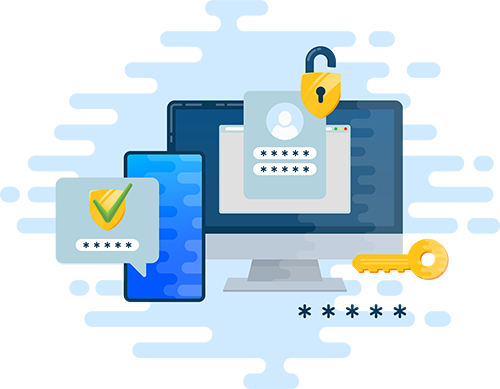
The weakness of password-only authentication for access to protected data is well known. Multifactor authentication (MFA) is a long-established way to address this weakness, but it wasn’t practical to deploy widely until the advent of cell phones and SMS for delivering second authentication factors. With nearly everyone owning a mobile phone today, MFA has become a familiar, regular, and highly trusted experience for most internet users.
As MFA has become more prevalent, bad actors have directed their attention to defeating it and have developed relatively simple ways to compromise basic MFA. Organizations can respond by implementing enhancements that cost more and require more user effort, but there’s no one-size-fits-all solution. The key is finding the right balance between the value of the data being protected and the cost and user effort associated with different security levels.
We discuss the evolution of MFA, its vulnerabilities, and some of the ways basic MFA can be enhanced to address those vulnerabilities. We also provide a brief survey of prominent MFA solution providers.
TABLE OF CONTENTS
Includes discussion of CYBR, MSFT, OKTA, OSPN and two private companies
- Beyond the simple password
- Digital MFA defined and brief history
- Basic MFA can be defeated
- Finding the right balance between MFA security level, risk, and resources
- No rest for the MFA fatigued
- Sector market activity: Cybersecurity index performance, M&A activity highlighting ForgeRock and Cider Security, and private placement activity highlighting Snyk and NetSPI
Beyond the simple password
Most everyone is aware of the ease of using simple usernames and passwords to access accounts on computers and phones and the attraction of using the same ones everywhere and having them remembered by all their devices for all their accounts. Most everyone is also aware of the risks of doing so. Of course, account administrators try to reduce these risks by demanding users regularly change and use ever more complex and unique passwords, much to the frustration of users. In the face of these challenges, digital multifactor authentication (MFA) has seen increased adoption because it provides a path to the holy grail of authentication – better security and ease of use. But MFA is not a silver bullet. Bad actors have developed novel attack techniques to compromise MFA. Ultimately, the increasing complexity of securely authenticating online access means there’s no one-size-fits-all solution. Rather, it’s more important than ever to use thoughtful approaches that take into account dynamic risk measures as well as the IT sophistication and capabilities an organization can bring to bear on its authentication needs. Thankfully, there are solutions that cater to all types of profiles, and the range of solutions is increasing with innovative offerings that enhance basic MFA. We think this innovation will spur increased spending in the category.
Digital MFA defined and brief history
Digital multifactor authentication uses two or more methods to authenticate identities of people (or in some cases computers) seeking access to protected data. Two-factor authentication (2FA) uses two methods. Relative to using single factors – particularly static usernames and passwords – authenticating identity through multiple steps reduces the likelihood of bad actors gaining access to sensitive information. Often, MFA uses usernames and passwords as one factor and one of several other factors as the second. The other factors generally fit in one of three categories:
- Something users know, such as PINs and answers to questions only authorized users would know
- Something users have, such as digital tokens users carry and one-time passwords provided by users’ smartphone apps and smartcards
- Something users are, which means biometrics such as fingerprints, facial images, retinal scans, phone behavior patterns, and voice patterns
In the 1980s, MFA technology usually used cards or fobs, like RSA’s SecureID tokens, that generated time-synchronous randomized codes as a second authentication factor. While this was generally effective at protecting assets, users found it cumbersome to carry a dedicated device for authentication. Employees frequently misplaced or lost their devices and then had to contact support staff to get access to their protected information. The difficulty only compounded for users who needed to carry multiple tokens for unrelated accounts.
Cell phones came to the rescue in the late 1990s with the advent of MFA solutions that sent second authentication factors as short-message-service (SMS) codes to users on a device they seldom lost and used constantly in their daily lives. As phones became more sophisticated and evolved into smartphones, it became feasible to use them for authentication protocols beyond SMS codes. With these changes, MFA became a daily experience for almost everyone using the internet, marking the advent of universally accessible authentication that was both relatively secure and user friendly.
Basic MFA can be defeated
Although MFA has made authentication more secure and user friendly, it’s not perfect. Its prevalence has prompted bad actors to develop attacks that defeat it. One such attack is MFA fatigue, also known as MFA push spam, MFA bombing, and prompt bombing. It targets users that normally log in with usernames and passwords as the first authentication factor (something they know) and users’ approvals of subsequent device-based notifications as the second authentication factor. Users typically receive the notifications from dedicated authentication apps on their smartphones (something they have) and confirm they requested account access by pressing an “approve” button in the app.
Example of a second authentication factor (dedicated smartphone authentication app notification)
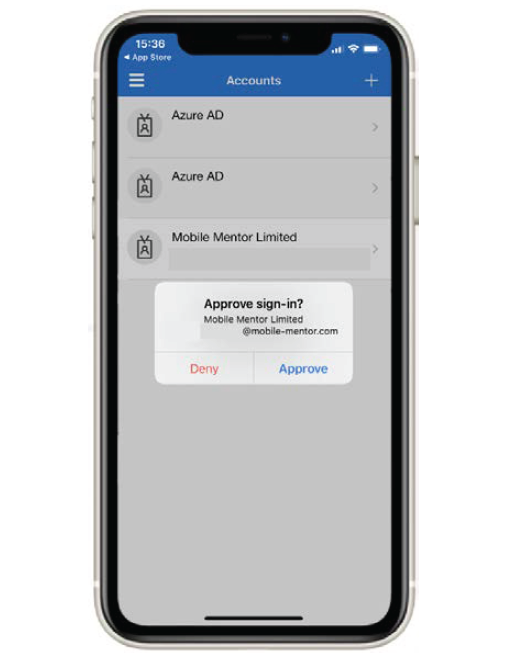
Source: Microsoft Authenticator App.
MFA fatigue attacks involve two steps. First, attackers obtain users’ usernames and passwords, sometimes by purchasing compromised logons from dark web internet sites, sometimes through phishing campaigns that trick users into revealing their usernames and passwords, and sometimes by using random-guess password generators. Once they have valid usernames and passwords, they can proceed to the second step: They use software to repeatedly enter usernames and passwords on targeted accounts, causing their real owners to receive many prompts to authenticate with the second factor. This typically means users receive a barrage of notifications on their smartphone authentication apps, with each notification prompting them to press the approve button. This continues until users approve one of the login attempts by pressing the approve button accidentally (or perhaps just out of frustration combined with a lack of awareness of what is really happening).
This attack is worthy of attention both because it has seen high-profile successes and because, at least in our view, it is easy to avoid. MFA fatigue attacks have occurred at sophisticated, large corporations. Microsoft has confirmed that in March 2022 the threat group Lapsus$ compromised a single user’s account, resulting in “limited access” to the company’s systems but not the data of any Microsoft customers. Lapsus$ has claimed to have exfiltrated portions of the company’s source code. Lapsus$ used a session replay attack to spam the user with MFA push notifications (an MFA fatigue attack).
In another instance, Cisco confirmed in August 2022 that the Yanluowang threat group gained access to its network. According to Cisco, “the user had enabled password syncing via Google Chrome and had stored their Cisco credentials in their browser, enabling that information to synchronize to their Google account.” Cisco confirmed the group was able to access the user’s personal account and then bypassed Cisco’s virtual private network (VPN) login security via MFA fatigue combined with social engineering (vishing or voice phishing). These techniques tricked the victim into approving a push notification, enabling the threat group to access Cisco’s VPN. In September 2022, a hacker used an MFA fatigue attack against a contracted Uber employee. Uber suspects the attacker purchased the employee’s username and password from the dark web and then used the credentials to prompt second-factor approval requests. Ultimately, the user accepted one, and the attacker was granted access. From there, the attacker accessed several other employee accounts that allowed for higher-security-clearance access.
Employee training and reminders not to approve unauthorized sign-in requests can help defeat MFA fatigue attacks, but as the successful attacks noted above show, relying on user vigilance is risky. A relatively simple solution many organizations are implementing to mitigate MFA fatigue attacks involves a small tweak to the approval process: Entering a valid username and password on a login page both 1) triggers notification via an authentication app and 2) causes the login page to display a number along with instructions for the user to press the same number among three numbered buttons (or sometimes more) displayed in the authentication app notification. Pressing the matching number successfully completes the authentication. When the target of an MFA attack receives multiple notifications, each notification contains at least three numbered buttons. The odds of successful authentication – that is, the odds the targeted user presses both the approve button and the correct numbered button – are substantially reduced. This is a large security improvement, albeit far from what we’d consider appropriate for protecting highly sensitive information.
Many other attacks that defeat or bypass MFA protection exist. They are usually more difficult to carry out and more difficult to defend against. Stealing session cookies is one example. Many websites manage authentication with session cookies stored in browsers to keep users authenticated throughout their sessions on sites. Attackers can use malware on compromised devices to steal these session cookies and use them to bypass the need to authenticate a new session under users’ identities. With access to authenticated sessions, attackers can further compromise users’ accounts by changing account authentication settings and discovering passwords they can use on an ongoing basis.
Higher-security smartphone authentication app notification
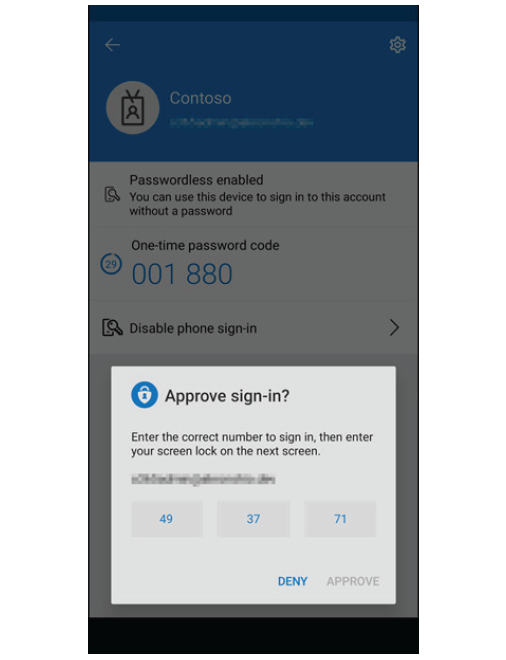
Source: Microsoft Authenticator App.
Man-in-the-middle attacks are another example. Attackers phish users by prompting them to enter their usernames and passwords in login pages controlled by the attacker but mimicking legitimate sites. Attackers then seamlessly pass the usernames and passwords to the legitimate sites. If protected by MFA using authentication notification, the user receives a notification as expected and approves it; this approval allows a protected session for the attacker’s device on the legitimate site. With usernames and passwords in hand, attackers then collect session cookies and other session information allowing them to effectively gain access at will going forward.
Finding the right balance between MFA security level, risk, and resources
Virtually no security system is bulletproof, so an important objective in securing access to protected information is finding the right balance between security level, acceptable risk levels, and available resources. There are many high-security authentication factors that can thwart most attack vectors, but these often have high administrative and hardware costs and entail a level of user effort that make them inappropriate for protecting information that poses little risk if compromised. The most secure authentication factors (the most expensive and requiring the most user effort) are appropriate for accounts with access to vast amounts of highly sensitive information.
High-security authentication factors include biometrics and solutions that conform to the non-profit FIDO Alliance’s Fast Identity Online (FIDO) standard. FIDO standards, which are considered quite strong, rely on public key cryptography combined with small hardware authenticators that connect to computers via USB, Bluetooth, and other direct-contact and near-presence protocols. They require users to register the authenticator for each site they need to authenticate on. One item organizations must be careful about is allowing relatively low-level security access for seemingly low-risk data where access to the host of this data opens a pathway for attackers to gain access to more sensitive data. Sometimes, these paths are difficult for IT personnel to find and track.
Other ways to enhance basic MFA security include assessing the context of authentication attempts. At a basic level, MFA solutions can be configured to limit the number of authentication attempts as well as lengthen the time required between attempts, making MFA attacks less likely to succeed. Most current solutions also offer an option to assess risk of compromised authentications by analyzing information such as device IP addresses, geographic location information, device physical velocity, device ID codes, and device health. Some solutions use machine learning and artificial intelligence to determine baseline profiles of user activity that can be compared to ongoing sessions to identify anomalous behavior that could indicate an attack. Security teams can use this information to configure MFA systems to require higher-security or additional authentication factors for authentication attempts that show suspicious patterns. The solutions can also consider the sensitivity of information being protected and dynamically adjust authentication security level, requiring the highest-security authentication for access to the most sensitive information.
Most of the leading identity access management (IAM) providers offer their own MFA solutions or offer IAM solutions that integrate tightly with third-party MFA solutions.
- CyberArk’s (CYBR) MFA solution is well suited for established, sophisticated organizations including those with significant compliance demands and legacy technology. It is particularly strong in providing holistic security across all assets.
- Microsoft integrates a wide range of IAM and MFA solutions with some of its software offerings. It specializes in more-granular cybersecurity needs, such as automated identity governance features for large enterprise customers.
- Okta (OKTA) provides a modular selection of security solutions for organizations ranging from medium to enterprise size with particular strength in scalable, cloud-based, single sign-on and MFA services.
- One Identity provides IAM solutions for organizations of all sizes designed to automate and manage access to systems and data in a secure and compliant manner both in the cloud and on-premise.
- OneSpan (OSPN) provides an enterprise-caliber electronic signature and cloud authentication security solution with particular strength in MFA, risk analytics and application security.
- Ping Identity offers a full IAM platform with strength in securing access within entities. It’s well suited for organizations that need to secure critical IT infrastructure maintained on premises.
No rest for the MFA fatigued
In authentication as in other areas of digital security, the never-ending contest between security teams and attackers is a daily reality. But a diverse array of authentication security offerings combined with ongoing innovation means organizations can select solutions that appropriately balance cost and user effort against the sensitivity of the data they’re protecting, perhaps providing some peace of mind, if not relief from the fatigue inflicted by attackers.
Request full report
To access the full report, please provide your contact information in the form below. Thank you for your interest in First Analysis research.