
White paper: Cybersecurity
Securing the enterprise browser

TABLE OF CONTENTS
- From consumer browser to enterprise workspace – why now?
- From security to control to compliance (last-mile DLP and auditability)
- Solution architectures: How the models differ
- Economics, cost optimization and pricing levers
- AI in the browser: Guardrails and embedded productivity
- Deployment patterns and customer segmentation
- Evaluation checklist: How customers compare options
- Outlook: How the market will develop
- User experience and integration depth will be the primary drivers of success
- Vendor highlights
From consumer browser to enterprise workspace—why now?
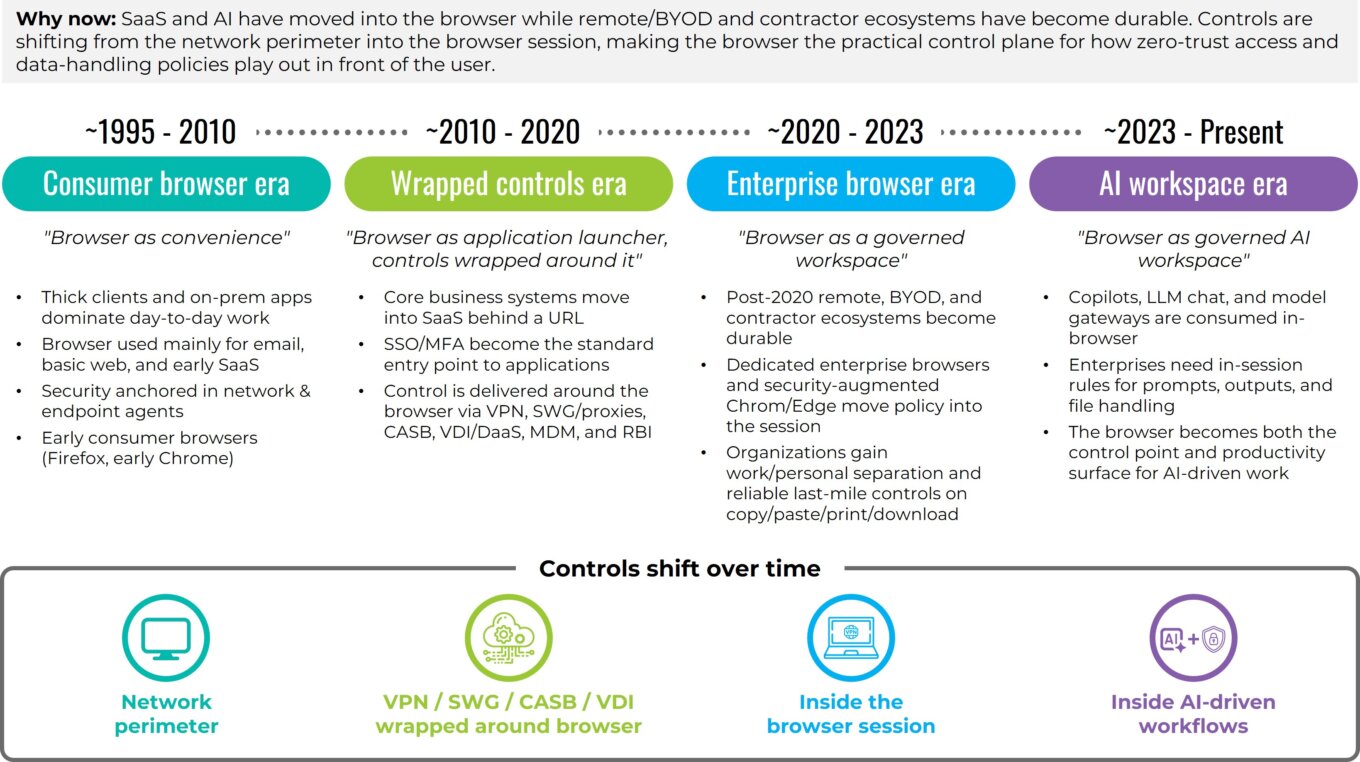
The browser has quietly become the enterprise’s primary workspace. Single sign-on (SSO) and multi-factor authentication (MFA), customer and patient records in SaaS applications, invoice and onboarding approvals, administrative-console changes, data exports, and everyday file handling are increasingly available behind a URL, yet the default consumer browsers such as Chrome and Edge that power this work were never designed to enforce governance at the moment of use.
These market-share-leading browsers excel at reach and compatibility and have historically served consumer needs like shopping, media and entertainment. However, they do not natively provide enterprise-grade separation of work and personal identities, reliable last-mile data-loss controls, or the structured audit trails organizations need to prove compliance. That gap has pushed security controls to wrap around the browser.
The market is now shifting those controls into the browser session itself so policy and user experience align where work actually happens. At the same time, AI-native consumer browsers are experimenting with assistant-centric experiences, but without the enterprise-grade separation of identities, data controls and evidence that large organizations require.
As this shift unfolds, it is worth looking at the market itself. How mature is it? How large will it become? Who is adopting this technology? Although multiple vendors now have credible deployments, the enterprise browser category is still early in formal market maturity. We view it as an early but rapidly accelerating segment with three prominent characteristics:
- Buyer understanding is rising quickly. Most security leaders can now articulate the need for session-level governance, last-mile data leak protection (DLP), and AI usage controls even if they have not yet deployed an enterprise browser.
- Architectures are converging. Dedicated work browsers, extension-based hardening and selective isolation are now recognized patterns rather than experiments.
- Evaluations are structured. Enterprises consistently assess user experience, performance, identity and secure service edge (SSE) integration, audit depth, and economics tied to virtual desktop infrastructure (VDI) and virtual private network (VPN) displacement.
We estimate that fewer than 5% of enterprises have adopted browser-level control broadly, while another 10% to 15% are evaluating it, especially in regulated and SaaS-centric environments. The majority, roughly 50% to 60% by our estimate, acknowledge the need but have not yet formalized evaluation. This distribution reflects a classic early-adopter profile for the category.
From a market-size perspective, browser governance touches a large share of workers. Of about 250 million to 350 million relevant enterprise SaaS seats globally, current spend across dedicated enterprise browsers, extension-based governance, and session-layer control suggests a practical, near-term total addressable market of $1 billion to $3 billion expanding toward $6 billion to $15 billion over the next 5 to 10 years as browser-centered AI workflows standardize. This projection aligns with the adoption curves of adjacent categories like cloud access security broker (CASB), secure web gateway (SWG), DLP, and zero-trust network access (ZTNA) once evaluations and architectures solidified. These figures represent First Analysis estimates informed by vendor briefings, customer references and adjacent SSE, CASB, and DLP market benchmarks. Since this category is still emerging, formal third-party industry sizing remains limited.
Against this backdrop of early but accelerating market maturity, AI has acted as a catalyst. Most copilots, large language model (LLM) chat interfaces, and model gateways are used in the browser, where users enter prompts that often draw from data across multiple SaaS applications and move sensitive outputs to these and other applications. This raises two simultaneous needs: 1) a need for enforceable in-session rules that govern prompts, outputs, and file handling and 2) a need for assistive capabilities that materially improve throughput without leaking data. As we noted in our AI security report, early AI deployments in security have also revealed practical limits like false positives, opaque detections and the operational cost of black-box decisions. These limits have pushed customers toward approaches that combine strong, explainable controls with measurable efficiency gains. In short, the browser has become both the control point and the productivity surface for AI-driven work. Later in this report, we explore how these AI dynamics reinforce the browser’s role as the primary workspace rather than a channel AI displaces.
For clarity, we define the enterprise browser as a dedicated, Chromium-based work browser with embedded security and management. It isolates corporate activity from personal use; enforces zero-trust policy at the session layer using identity, posture (how secure a device is) and application context; and provides last-mile controls for copy-paste actions, printing, downloads, watermarking and trust marking, view-only modes, and screenshot handling, all backed by structured, exportable audit logs. Compared with consumer Chrome and Edge browsers, an enterprise browser enables deeper administrative policy, stronger identity isolation and credential protections, granular and reliable data-in-use controls, and hardened defenses against tampering and exfiltration.
COVID-19 created more urgency to shift. Post-2020 remote work arrangements, contractor ecosystems, and the increase in employees and contractors using their personal devices at work (bring-your-own-device, or BYOD) made the challenge of managing access to enterprise resources more difficult. Legacy approaches to address this challenge offer control but at a cost. For example, VDI, desktop-as-a-service (DaaS) and full-device mobile device management (MDM) introduce material operational friction by requiring IT to provision and maintain full virtual desktops or locked-down device profiles, each with its own configuration, updates and support burden. For users, these solutions add extra steps, slow logins, and create a second workspace they must navigate just to access standard SaaS applications. VPNs collapse application-specific need into blanket network connectivity, enlarging the trust zone and thereby introducing risk in ways modern zero-trust models avoid. Remote browser isolation (RBI) contains web risk by executing active content remotely but can add latency and cost if applied broadly. Today, browser‑centric models offer a better solution. Two browser-centric models now dominate: 1) using dedicated enterprise browsers, which standardize a governed Chromium workspace with reliable last‑mile controls and 2) hardening and securing conventional Chrome and Edge browsers (“the browsers you have”) with extensions and agents. Many enterprises blend the two by persona and device context, across managed devices and unmanaged devices (BYOD), rather than following a single, one‑size‑fits‑all pattern.
Evolution of the browser workspace
Source: First Analysis
Adoption patterns reflect this pragmatism. Early wins for the browser-centric model are in situations where enterprises interact with contractors and other third parties, M&A transition teams, and BYOD populations (including unmanaged devices). In these environments, IT cannot easily standardize corporate device builds or deploy heavy agents, which limits what departments can reliably install or control. On managed fleets (the devices an enterprise controls) and BYOD, many organizations begin by hardening the browsers already installed and reserve a dedicated enterprise browser for higher-risk personas and workflows. RBI is applied selectively for the riskiest destinations and file types, and VDI is held in reserve for niche legacy applications. Across all models, customers are converging on the same evaluation criteria: depth and reliability of last-mile controls; user experience and performance under real conditions; clean integrations with identity, posture and security tooling; telemetry that lands well in existing incident response workflows; credible compliance evidence; economics that tie licensing to clear offsets in VDI, VPN and support expense; and measurable gains in throughput and productivity. As workflows and AI assistants move deeper into SaaS, the browser is becoming the practical control plane for how zero-trust access and data-handling policies play out in front of users.
Put differently, the market is in its early stages, the need is acute and acceleration is visible. As more AI-driven actions occur in the browser, session-level governance is becoming a foundational element of the modern enterprise workspace. Because the browser is now where both human and AI-assisted work originate, the focus is shifting from perimeter security to last-mile, data-in-use controls and structured auditability.
From security to control to compliance (last-mile DLP and auditability)
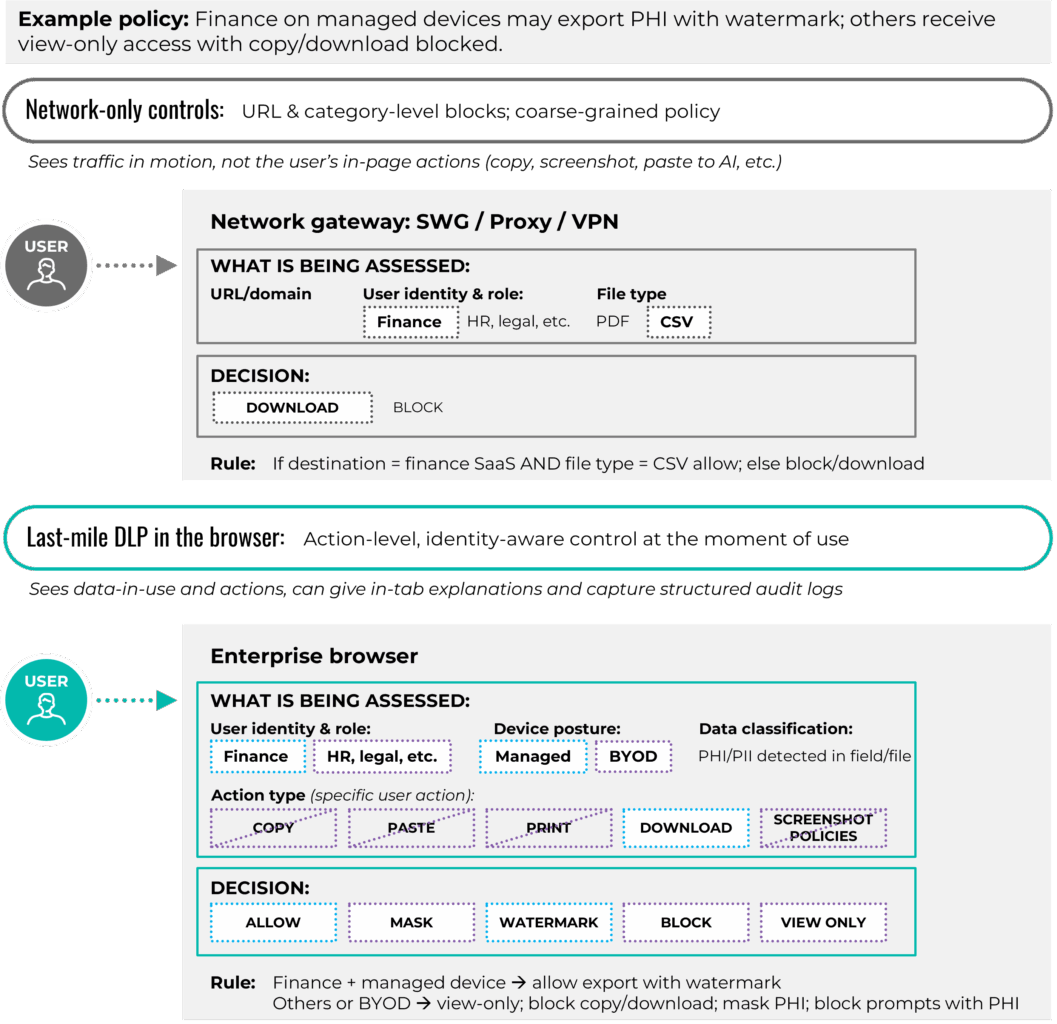
The focus of the security sector’s discussion of how to best address security challenges has shifted from perimeter control to control within the browser session. When the browser is the workspace, the most reliable place to govern data in use is inside the browser, where users type prompts, populate fields, preview files and issue approvals. An enterprise browser can enforce security on these actions. Copying, pasting, printing, downloading, accessing clipboards and capturing screens can be permitted, masked, watermarked or blocked based on user identity, device posture, application type and data type. Policy messages appear in the tab and explain what is allowed, which reduces pushback and training load while keeping users productive.
The last-mile DLP enabled by enterprise browsers is the first pillar of browser session governance. It differs from network-only controls. Traditional “safe browsing” capabilities focus on blocking or isolating access to sites that are known to be malicious and on filtering risky categories. Last-mile controls extend this security by managing what users actually do with sensitive data once a page is loaded. Instead of blocking specific sites entirely or blocking sites at a proxy based on generalized threat patterns, enterprise browser security policy acts at the page, field and action level. Practical examples include allowing data exports by finance personnel working on managed devices, forcing view-only access for source code on unmanaged devices, watermarking protected health information downloads for healthcare personnel, preventing social security numbers from being pasted into chat prompts, and pausing screen sharing when a user’s screen is displaying confidential data. Because enforcement happens in the browser session, controls follow the user across SaaS applications and embedded AI assistants without relying on each application’s native settings or a one-size-fits-all network rule.
Auditability is the second pillar of browser session governance. Action-level telemetry records who did what, in what application, on which device posture, and with what policy outcome. Investigations become faster because analysts search structured events rather than reconstructing activity from several systems. Insider-risk triage focuses on the sequence of actions before and after a sensitive event. Operations benefit as well because support staff can see, for example, that a download failed when device posture changed or the user entered a restricted workspace, rather than having to diagnose the failure based on an error message with little context.
From network-only DLP to last-mile DLP
Source: First Analysis
Integrations complete the control loop. Identity, device posture and data classification feed the browser policy so rules adapt in real time. Customers can require increased authentication measures for sensitive actions, restrict risky extensions by role, enforce view-only access for untrusted file types, or trigger selective isolation for high-risk destinations. Export paths matter too. Clear paths and data mapping into existing security information and event management (SIEM), security orchestration, automation and response (SOAR), and extended detection and response (XDR) solutions help preserve existing workflows and avoid a parallel incident process for the browser.
While the core mechanics of securing the enterprise browser are consistent, priorities vary by the industry vertical in which they are used. In healthcare and the public sector, data residency, protected health information handling, masking and predictable behavior on shared workstations often lead the requirements list. Financial services and fintech lean heavily on screenshot control, multi-monitor behavior, tamper resistance and detailed audit trails that tie each action to a case or account. Business-process outsourcing and offshore service providers focus on contractor and BYOD coverage, per-client segregation inside the browser, and clear evidence they can show end customers during audits. These differences do not change the fundamentals of last-mile DLP and auditability, but they do shape which controls need to be proven first in a pilot and how vendors tailor their reference architectures and case studies.
Customers also want clarity about where enforcement actually happens. Some products evaluate policy and log events locally in the browser or on the endpoint device, while others route metadata, rendered content or full sessions through a vendor cloud for inspection, isolation or AI assistance. Both models can be effective, but the choice has implications for latency, data residency and regulatory scope, so vendors increasingly need to document which data elements leave the device and how they are processed and retained.
Insider-risk management also improves under the enterprise browser model because it treats risky behavior as a series of actions rather than a single binary event. Light coaching in the moment, such as “redact PII before sharing” or “policy requires view-only here,” minimizes many risks at the source. When intent is malicious or impact is severe, policy denies the action, telemetry captures the context, and the response team reacts quickly with the relevant evidence.
With these control requirements established, the next choice is architectural: Which enforcement models can reliably deliver this level of session governance, and where do they fit?
Request full report
To access the full report, please provide your contact information in the form below. Thank you for your interest in First Analysis research.